Activity Rings
From syxUI — written for both platforms, not translated between them.
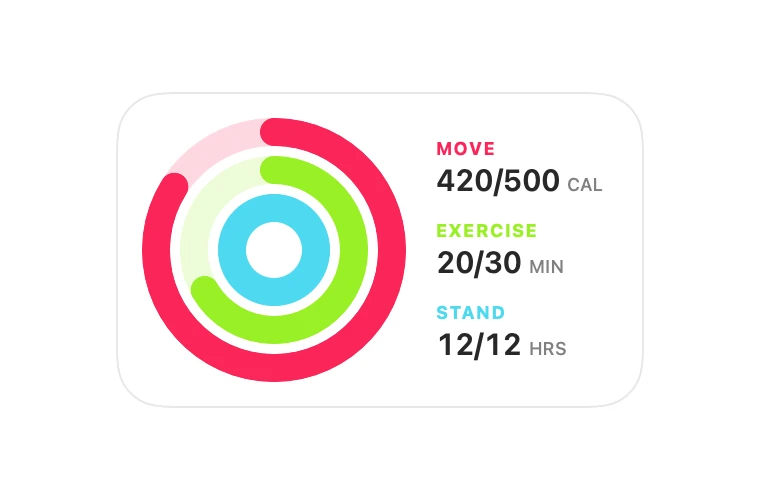
Three concentric progress rings with a legend, animating in on appear.
Charts · SwiftUI · Flutter · iOS 17 · Flutter 3.27
- chart
- rings
- progress
- fitness
- health
- activity
The actual source
ActivityRings.swift
// Activity Rings · syxUI · https://syxui.dev/components/activity-rings
// Free in any project. Keep this line and credit syxUI where a person can read it.

import SwiftUI

/// Three concentric progress rings with a legend.
///
/// Rings can exceed 100% — the trim wraps past 1.0 rather than clamping, which
/// is what makes an over-goal day read as an over-goal day.
struct ActivityRings: View {
    struct Ring: Identifiable {
        let id = UUID()
        var label: String
        var value: Double
        var goal: Double
        var unit: String
        var color: Color

        var progress: Double { goal <= 0 ? 0 : value / goal }
    }

    var rings: [Ring] = [
        .init(label: "Move", value: 420, goal: 500, unit: "CAL",
              color: Color(red: 0.98, green: 0.15, blue: 0.35)),
        .init(label: "Exercise", value: 20, goal: 30, unit: "MIN",
              color: Color(red: 0.60, green: 0.94, blue: 0.15)),
        .init(label: "Stand", value: 12, goal: 12, unit: "HRS",
              color: Color(red: 0.30, green: 0.85, blue: 0.94)),
    ]

    var lineWidth: CGFloat = 14
    var spacing: CGFloat = 5
    /// Drive the fill yourself with 0...1 instead of running it on appear.
    var progress: Double? = nil

    @Environment(\.accessibilityReduceMotion) private var reduceMotion
    @State private var animate = false

    var body: some View {
        HStack(spacing: 22) {
            ZStack {
                ForEach(Array(rings.enumerated()), id: \.element.id) { index, ring in
                    RingShape(
                        progress: ring.progress * (progress ?? (animate || reduceMotion ? 1 : 0)),
                        color: ring.color,
                        lineWidth: lineWidth
                    )
                    .padding(CGFloat(index) * (lineWidth + spacing))
                }
            }
            .frame(width: 118, height: 118)

            VStack(alignment: .leading, spacing: 10) {
                ForEach(rings) { ring in
                    VStack(alignment: .leading, spacing: 1) {
                        Text(ring.label.uppercased())
                            .font(.system(size: 9, weight: .bold))
                            .foregroundStyle(ring.color)
                            .tracking(0.6)
                        HStack(alignment: .firstTextBaseline, spacing: 3) {
                            Text("\(Int(ring.value))/\(Int(ring.goal))")
                                .font(.system(size: 15, weight: .semibold))
                                .monospacedDigit()
                            Text(ring.unit)
                                .font(.system(size: 9, weight: .medium))
                                .foregroundStyle(.secondary)
                        }
                    }
                    .accessibilityElement(children: .combine)
                    .accessibilityLabel("\(ring.label): \(Int(ring.value)) of \(Int(ring.goal)) \(ring.unit)")
                }
            }
        }
        .padding(20)
        .background(.white, in: RoundedRectangle(cornerRadius: 24, style: .continuous))
        .overlay {
            RoundedRectangle(cornerRadius: 24, style: .continuous)
                .strokeBorder(Color(white: 0.91), lineWidth: 1)
        }
        .onAppear {
            guard !reduceMotion, progress == nil else { return }
            withAnimation(.easeOut(duration: 0.9)) { animate = true }
        }
    }
}

private struct RingShape: View {
    let progress: Double
    let color: Color
    let lineWidth: CGFloat

    var body: some View {
        ZStack {
            Circle()
                .stroke(color.opacity(0.18), lineWidth: lineWidth)
            Circle()
                .trim(from: 0, to: min(progress, 1))
                .stroke(color, style: StrokeStyle(lineWidth: lineWidth, lineCap: .round))
                .rotationEffect(.degrees(-90))
        }
    }
}

#Preview {
    ActivityRings()
        .padding(30)
}
iOS 17 · No dependencies
SwiftUI note. Rings are stacked SwiftUI shapes, so each is a separate layer. For more than four rings move to a single Canvas.
Dependencies
- SwiftUI
- No external dependencies
- Flutter
- No external dependencies
Requires iOS 17
Requires Flutter 3.27