Balance Card
From syxUI — written for both platforms, not translated between them.
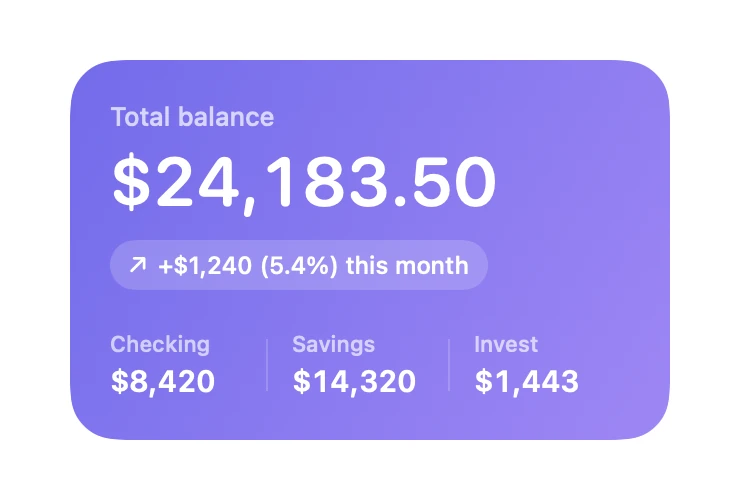
An account summary with a headline figure, a delta pill, and sub-balances.
Cards · SwiftUI · Flutter · iOS 17 · Flutter 3.27
- card
- finance
- balance
- money
- dashboard
- stats
The actual source
BalanceCard.swift
// Balance Card · syxUI · https://syxui.dev/components/balance-card
// Free in any project. Keep this line and credit syxUI where a person can read it.

import SwiftUI

/// A account-summary card: one headline figure, a delta, and two sub-balances.
///
/// The figure uses monospaced digits so the number does not jitter when it
/// animates or refreshes.
struct BalanceCard: View {
    var title: String = "Total balance"
    var amount: String = "$24,183.50"
    var delta: String = "+$1,240 (5.4%) this month"
    var isPositive: Bool = true
    var breakdown: [(label: String, value: String)] = [
        ("Checking", "$8,420"),
        ("Savings", "$14,320"),
        ("Invest", "$1,443"),
    ]

    var body: some View {
        VStack(alignment: .leading, spacing: 0) {
            Text(title)
                .font(.system(size: 13, weight: .medium))
                .foregroundStyle(.white.opacity(0.7))

            Text(amount)
                .font(.system(size: 34, weight: .semibold, design: .rounded))
                .monospacedDigit()
                .padding(.top, 4)

            HStack(spacing: 5) {
                Image(systemName: isPositive ? "arrow.up.right" : "arrow.down.right")
                    .font(.system(size: 10, weight: .bold))
                Text(delta)
                    .font(.system(size: 12, weight: .medium))
            }
            .foregroundStyle(.white)
            .padding(.horizontal, 9)
            .padding(.vertical, 5)
            .background(.white.opacity(0.18), in: Capsule())
            .padding(.top, 10)

            Spacer(minLength: 16)

            HStack(spacing: 0) {
                ForEach(Array(breakdown.enumerated()), id: \.offset) { index, item in
                    VStack(alignment: .leading, spacing: 2) {
                        Text(item.label)
                            .font(.system(size: 11, weight: .medium))
                            .foregroundStyle(.white.opacity(0.65))
                        Text(item.value)
                            .font(.system(size: 15, weight: .semibold))
                            .monospacedDigit()
                    }
                    .frame(maxWidth: .infinity, alignment: .leading)

                    if index < breakdown.count - 1 {
                        Rectangle()
                            .fill(.white.opacity(0.18))
                            .frame(width: 1, height: 26)
                            .padding(.trailing, 12)
                    }
                }
            }
        }
        .foregroundStyle(.white)
        .padding(20)
        .frame(width: 300, height: 190, alignment: .topLeading)
        .background(
            LinearGradient(
                colors: [Color(red: 0.45, green: 0.42, blue: 0.92),
                         Color(red: 0.62, green: 0.53, blue: 0.96)],
                startPoint: .topLeading,
                endPoint: .bottomTrailing
            ),
            in: RoundedRectangle(cornerRadius: 24, style: .continuous)
        )
        .accessibilityElement(children: .combine)
        .accessibilityLabel("\(title) \(amount), \(delta)")
    }
}

#Preview {
    BalanceCard()
        .padding(30)
}
iOS 17 · No dependencies
SwiftUI note. Format currency with a NumberFormatter or FormatStyle upstream rather than passing pre-baked strings, so the card localises.
Dependencies
- SwiftUI
- No external dependencies
- Flutter
- No external dependencies
Requires iOS 17
Requires Flutter 3.27