Push Alert
From syxUI — written for both platforms, not translated between them.
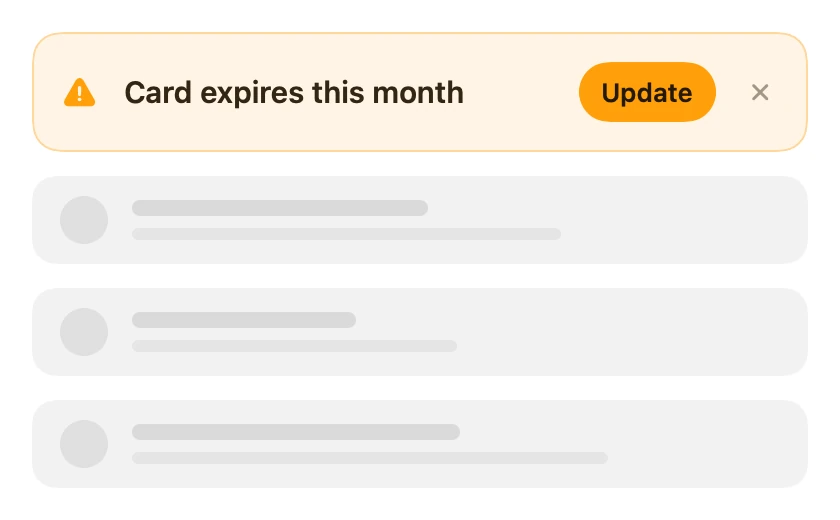
An inline alert that opens a gap in the content on its own spring, then drops into the space it made.
Banners · SwiftUI · Flutter · iOS 17 · Flutter 3.27
- banner
- alert
- inline
- displacement
- spring
- layout
- swipe
The actual source
// Push Alert · syxUI · https://syxui.dev/components/banner-push-alert
// Free in any project. Keep this line and credit syxUI where a person can read it.

import SwiftUI

// MARK: - Motion

/// One spring, in the `(response, dampingFraction)` terms SwiftUI uses.
///
/// At unit mass these convert exactly to `stiffness = ω₀²` and `damping = 2ζω₀`,
/// which is what both `interpolatingSpring` and Flutter's `SpringDescription`
/// take — so the two files run the same springs rather than two tunings that
/// merely look similar.
private struct Spring {
    let response: Double
    let damping: Double

    var omega: Double { 2 * .pi / max(response, 0.05) }
    var stiffness: Double { omega * omega }
    var friction: Double { 2 * damping * omega }

    /// How long this spring takes to be visually settled: `6/(ζω₀)`.
    ///
    /// Not the commonly quoted `4/(ζω₀)` — at 4 the analytic curve below is
    /// still ~2 % short at `p = 1`, and 2 % of a 60 pt panel is a visible
    /// misalignment in a still frame. At 6 it lands inside 0.3 %.
    var settle: Double { 6 / (damping * omega) }

    /// `interpolatingSpring` rather than `.spring(response:dampingFraction:)`
    /// because interpolating springs compose velocity across an interruption:
    /// a second dismissal landing mid-arrival continues from the arrival's own
    /// speed instead of restarting from a standstill.
    var animation: Animation {
        .interpolatingSpring(stiffness: stiffness, damping: friction)
    }
}

/// The analytic underdamped step response at time `t`.
///
/// The live path runs real springs, which cannot be sampled from a `Double`.
/// This is the resolution: one geometry, two drives. Both springs below are
/// evaluated against the **same** time axis, which is the only way the lead is
/// real — sample each against its own settle time and the two curves collapse
/// onto each other and the whole component evaporates.
private func springShape(_ t: Double, _ spring: Spring) -> Double {
    guard t > 0 else { return 0 }
    let zeta = min(max(spring.damping, 0.05), 0.999)
    let decay = zeta * spring.omega
    let damped = spring.omega * (1 - zeta * zeta).squareRoot()
    return 1 - exp(-decay * t)
        * (cos(damped * t) + (decay / damped) * sin(damped * t))
}

/// A spring that continues at the finger's speed instead of restarting.
///
/// `interpolatingSpring` is the only SwiftUI spring that accepts a release
/// velocity, and `initialVelocity` is **normalised and signed against the
/// remaining travel**: 1.0 means "cover what is left in one second", and a
/// negative value means the finger is still moving away from the target. So it
/// is `velocity / travel`, never `velocity / abs(travel)`. Passing raw pt/s
/// launches the alert clean off the screen.
private func handOff(_ spring: Spring, velocity: CGFloat, travel: CGFloat) -> Animation {
    .interpolatingSpring(
        stiffness: spring.stiffness,
        damping: spring.friction,
        initialVelocity: abs(travel) < 1 ? 0 : Double(velocity / travel)
    )
}

// MARK: - Component

/// An inline alert that opens a gap in the content and then drops into it.
///
/// This **displaces**: it is a real row in your stack, so everything under it
/// moves down. That is the whole point. An overlay that never leaves is a
/// permanent obstruction, so anything persistent — a card expiring, an
/// unverified email, a quota notice — has to take up space.
///
/// The naive version of this is `if shown { Alert() }` inside a `VStack`, which
/// hands the insertion to SwiftUI's default transition and jumps every row
/// below by the alert's full height in one step. Here the alert is always in
/// the tree and two springs do the work:
///
/// - the **gap** — this view's own height — opens on `gapResponse`
/// - the **alert** — the panel inside it — arrives on `alertResponse`
///
/// `gapResponse` is the stiffer of the two on purpose, so the space is ready
/// roughly 90 ms before the alert needs it. Run both on one spring and the
/// alert lands on content that is still sliding out from under it, which reads
/// as a collision. Removal reverses the pairing: the alert leaves first and the
/// gap follows it up, so content trails the alert instead of racing it.
struct PushAlert: View {

    // MARK: Controls

    /// Gap spring response, seconds. Hoisted because a spring written inline is
    /// not something a control can reach. Keep it below `alertResponse`.
    var gapResponse: Double = 0.32
    /// Alert spring response, seconds. The slower of the pair.
    var alertResponse: Double = 0.42
    var cornerRadius: CGFloat = 14
    var title: String = "Card expires this month"
    var surface: Color = Color(red: 1.0, green: 0.957, blue: 0.898)
    var accent: Color = Color(red: 1.0, green: 0.624, blue: 0.039)

    // MARK: Copy

    var actionTitle: String = "Update"
    var glyph: String = "exclamationmark.triangle.fill"

    // MARK: Feel

    var gapDamping: Double = 0.85
    var alertDamping: Double = 0.78
    /// Space the alert keeps between itself and the first row below. It is part
    /// of the reserved height, so it opens and closes on the gap spring too —
    /// a margin that appears after the gap has settled reads as a second jump.
    var spacingBelow: CGFloat = 12
    /// Release speed that commits a horizontal dismissal on its own, pt/s.
    /// Horizontal drags run faster than vertical ones, hence 640 and not 520.
    var dismissVelocity: CGFloat = 640
    /// Fraction of the width that commits on distance alone.
    var commitFraction: CGFloat = 0.34

    /// Drive it from your own state. When `nil` the alert presents itself on
    /// appear, which is what the catalog preview needs and what a screen that
    /// only ever shows one notice wants anyway.
    var isPresented: Binding<Bool>? = nil

    /// Preview override. One pass over the alert's whole life: 0 is no alert
    /// and the content at rest, ~0.5 is settled with the gap open, 1 is closed
    /// again — so the loop returns to where it started.
    var progress: Double? = nil

    // MARK: State

    @Environment(\.accessibilityReduceMotion) private var reduceMotion

    @State private var shown = false
    /// 0…1 on the gap spring. This is the height the rows below are pushed by.
    @State private var gapOpen: Double = 0
    /// 0…1 on the alert spring. This is the panel inside the gap.
    @State private var openness: Double = 0
    @State private var leaving = false
    @State private var swipe: CGFloat = 0
    @State private var anchor: CGFloat = 0
    @State private var dragging = false
    @State private var armed = false
    /// The alert's natural height, measured from its own content. Never a
    /// constant: a two-line title has to grow the gap, not overflow the panel.
    @State private var natural: CGFloat = 0
    @State private var width: CGFloat = 0
    /// Drives the tap haptic only. A swipe already spent its feedback when it
    /// armed, and C12 is explicit that nothing fires on insert.
    @State private var taps = 0

    /// True only while the gesture is live. A cancelled `DragGesture` never
    /// calls `onEnded`, so without this the alert would stay where the finger
    /// left it when a system gesture stole the touch.
    @GestureState private var held = false

    // MARK: Springs

    private var gapSpring: Spring { Spring(response: gapResponse, damping: gapDamping) }
    private var alertSpring: Spring { Spring(response: alertResponse, damping: alertDamping) }

    /// The reverse pairing, as ratios of the entry springs rather than two more
    /// constants. C1's exit pair is `(0.30, 0.78)` leaving and `(0.36, 0.82)`
    /// closing against an entry pair of `(0.42, 0.78)` and `(0.32, 0.85)`, so
    /// the alert leaves 29 % quicker than it arrived and the gap closes 13 %
    /// slower than it opened. Expressed as ratios, that asymmetry survives a
    /// reader moving either slider; written as literals it would quietly invert
    /// the moment someone slowed the arrival down.
    private var leaveSpring: Spring { Spring(response: alertResponse * 0.714, damping: 0.78) }
    private var closeSpring: Spring { Spring(response: gapResponse * 1.125, damping: 0.82) }

    /// A committed horizontal throw: leaves without oscillating, because it is
    /// leaving, not landing.
    private let throwSpring = Spring(response: 0.50, damping: 0.85)
    /// Released below the threshold. Springs back — but carrying the release
    /// velocity, so a half-flick still looks like it was thrown.
    private let returnSpring = Spring(response: 0.34, damping: 0.85)

    /// How long the gap waits before it starts closing.
    ///
    /// C1's rule is that the gap may not move until the alert is under 0.4
    /// opacity — closing on release pulls content up under something still
    /// visible. Solved off the actual leave curve rather than pinned to a
    /// constant, so the rule still holds when a reader changes `alertResponse`.
    private var closeDelay: Double {
        let spring = leaveSpring
        let steps = 64
        for i in 0...steps {
            let t = spring.settle * Double(i) / Double(steps)
            if PushAlert.presence(1 - springShape(t, spring)) < 0.4 { return t }
        }
        return 0
    }

    // MARK: Fade windows

    /// Copy is present only over the last third of the panel's travel, and the
    /// window is the same in both directions — it opens late on the way in and
    /// closes early on the way out, because the constraint is the same one
    /// either way. Below 0.62 the panel is shorter than the row it contains,
    /// and copy rendered inside a box that short is clipped. That is the defect
    /// this component ships if nobody looks at the filmstrip, and it is a
    /// defect on the exit exactly as much as on the entry.
    static func reveal(_ v: Double) -> Double {
        min(max((v - 0.62) / 0.35, 0), 1)
    }

    /// The panel's own presence. It is solid the whole way in — growing *is*
    /// its arrival — and fades only over the last of its collapse, so the final
    /// hairline dissolves instead of blinking out. This is also what C1's rule
    /// measures: the gap may not start closing while this is above 0.4.
    static func presence(_ v: Double) -> Double {
        min(max(v / 0.45, 0), 1)
    }

    // MARK: Preview drive

    /// Where the drive puts the two springs. Both are sampled in *seconds* off
    /// one shared axis, so the lead is emergent: the gap settles first because
    /// it is the stiffer spring, not because a delay was hand-tuned in.
    private func staged(_ p: Double) -> (gap: Double, alert: Double, leaving: Bool) {
        // Sized so the springs play at real speed in the catalog loop
        // (32 frames at 15 fps = 2.13 s): 0.24 of the drive is the 0.51 s
        // arrival, 0.26 is the 0.53 s departure, and the rest is the page
        // sitting at rest — which is the half of the loop that proves the rows
        // moved, because you see where they were.
        let inStart = 0.08, inEnd = 0.32
        let outStart = 0.58, outEnd = 0.84

        if p < inStart { return (0, 0, false) }
        if p < outStart {
            let u = min((p - inStart) / (inEnd - inStart), 1)
            // The slower of the two sets the span, or a reader who made the gap
            // slower than the alert would see the insert end unsettled.
            let t = u * max(alertSpring.settle, gapSpring.settle)
            return (springShape(t, gapSpring), springShape(t, alertSpring), false)
        }
        let u = min((p - outStart) / (outEnd - outStart), 1)
        let delay = closeDelay
        let t = u * max(leaveSpring.settle, delay + closeSpring.settle)
        return (1 - springShape(max(0, t - delay), closeSpring),
                1 - springShape(t, leaveSpring),
                true)
    }

    // MARK: Body

    var body: some View {
        let stage = progress.map(staged)
        let gap = stage?.gap ?? gapOpen
        let open = stage?.alert ?? openness
        let out = stage?.leaving ?? leaving
        let reserved = natural + spacingBelow

        AlertPanel(
            openness: open,
            swipe: stage == nil ? swipe : 0,
            natural: natural,
            width: width,
            cornerRadius: cornerRadius,
            surface: surface,
            border: accent.opacity(0.34),
            leaving: out
        ) {
            row
        }
        .frame(height: max(reserved * gap, 0), alignment: .top)
        .frame(maxWidth: .infinity, alignment: .top)
        // A plain rect, not the panel's rounded shape: the gap is a slot in the
        // page, and it is the panel that has corners.
        .clipShape(Rectangle())
        .contentShape(Rectangle())
        .gesture(swipeAway)
        .allowsHitTesting(progress == nil && shown)
        .background {
            GeometryReader { proxy in
                Color.clear.preference(key: SlotWidthKey.self, value: proxy.size.width)
            }
        }
        .onPreferenceChange(PanelHeightKey.self) { natural = $0 }
        .onPreferenceChange(SlotWidthKey.self) { width = $0 }
        .onAppear { if isPresented?.wrappedValue ?? true { present() } }
        .onChange(of: isPresented?.wrappedValue) { _, next in
            guard let next else { return }
            next ? present() : dismiss(velocity: 0)
        }
        .onChange(of: held) { _, now in if !now { cancelDrag() } }
        .sensoryFeedback(trigger: armed) { _, now in
            now ? .impact(weight: .light, intensity: 0.4) : nil
        }
        .sensoryFeedback(.selection, trigger: taps)
        .accessibilityHidden(gap < 0.05)
    }

    // MARK: Chrome

    /// The row is laid out by `AlertRow` so the title can never be truncated by
    /// the controls beside it, and its measured height is what opens the gap.
    private var row: some View {
        AlertRow(spacing: 12, rowSpacing: 10) {
            Image(systemName: glyph)
                .font(.system(size: 15, weight: .semibold))
                .foregroundStyle(accent)
                .frame(width: 20, height: 20)
                .accessibilityHidden(true)

            Text(title)
                .font(.system(size: 15, weight: .semibold))
                .foregroundStyle(Self.ink)
                // No line limit anywhere in this file. Copy that does not fit
                // wraps and the panel grows; it never shrinks and never clips.
                .fixedSize(horizontal: false, vertical: true)

            actionPill
            closeControl

            // The floor, measured rather than guessed. `AlertRow` needs to know
            // the narrowest box the title can take without a word being broken
            // across lines, and SwiftUI will not tell you: proposing a `Text`
            // zero width makes it agree to break the word instead of reporting
            // the word's width. So the longest word is handed to the layout as
            // its own hidden subview and measured at its ideal size — same
            // font, same metrics, nothing to drift.
            Text(Self.longestWord(title))
                .font(.system(size: 15, weight: .semibold))
                .fixedSize()
                .hidden()
        }
        .padding(.horizontal, 14)
        .padding(.vertical, 15)
        .background {
            GeometryReader { proxy in
                Color.clear.preference(key: PanelHeightKey.self, value: proxy.size.height)
            }
        }
    }

    private var actionPill: some View {
        Button { } label: {
            Text(actionTitle)
                .font(.system(size: 13, weight: .semibold))
                .foregroundStyle(Self.pillInk)
                .padding(.horizontal, 11)
                .frame(height: 30)
                .background(accent, in: Capsule(style: .continuous))
        }
        .buttonStyle(.plain)
        .accessibilityLabel(actionTitle)
    }

    private var closeControl: some View {
        Button {
            taps += 1
            dismiss(velocity: 0)
        } label: {
            Image(systemName: "xmark")
                .font(.system(size: 10, weight: .bold))
                .foregroundStyle(Self.ink.opacity(0.45))
                .frame(width: 20, height: 20)
                .contentShape(Rectangle())
        }
        .buttonStyle(.plain)
        .accessibilityLabel("Dismiss")
    }

    private static func longestWord(_ text: String) -> String {
        let words = text.split(whereSeparator: \.isWhitespace)
        return String(words.max(by: { $0.count < $1.count }) ?? "")
    }

    /// Warm ink rather than a neutral grey: on a `#FFF4E5` surface a cool grey
    /// reads as a rendering error, and this is 12:1 against it.
    private static let ink = Color(red: 0.196, green: 0.149, blue: 0.078)
    private static let pillInk = Color(red: 0.145, green: 0.098, blue: 0.035)

    // MARK: Interaction

    private var swipeAway: some Gesture {
        DragGesture(minimumDistance: 8)
            .updating($held) { _, state, _ in state = true }
            .onChanged { value in
                guard progress == nil, shown, width > 0 else { return }
                if !dragging {
                    dragging = true
                    anchor = swipe
                }
                // 1:1 with the finger. There is nothing to rubber-band against
                // here — both directions dismiss, so neither has an edge.
                swipe = anchor + value.translation.width

                let line = width * commitFraction
                // Latched: re-arm only well below the line, or a finger resting
                // on it buzzes every frame.
                if abs(swipe) >= line { armed = true } else if abs(swipe) < line * 0.85 { armed = false }
            }
            .onEnded { value in
                guard progress == nil, shown, width > 0 else { return }
                let velocity = value.velocity.width
                dragging = false
                armed = false

                // Decided on the projected stop, not on where the finger
                // stopped. 0.20 s of coasting — an alert is a control-scale
                // throw, not a page-scale one.
                let projected = swipe + velocity * 0.20
                let commits = abs(value.translation.width) >= width * commitFraction
                    || abs(projected) >= width * 0.5
                    || abs(velocity) >= dismissVelocity

                if commits {
                    dismiss(velocity: velocity)
                } else {
                    guard !reduceMotion else { swipe = 0; return }
                    withAnimation(handOff(returnSpring, velocity: velocity, travel: -swipe)) {
                        swipe = 0
                    }
                }
            }
    }

    // MARK: Presentation

    private func present() {
        guard !shown, progress == nil else { return }
        shown = true
        leaving = false
        swipe = 0
        guard !reduceMotion else { gapOpen = 1; openness = 1; return }
        // Two calls, so each state change carries its own spring. One
        // `withAnimation` around both would put the gap and the alert on the
        // same curve, and the lead — the entire component — would disappear
        // while the code still looked correct.
        withAnimation(gapSpring.animation) { gapOpen = 1 }
        withAnimation(alertSpring.animation) { openness = 1 }
    }

    private func dismiss(velocity: CGFloat) {
        guard shown, progress == nil else { return }
        shown = false
        leaving = true
        isPresented?.wrappedValue = false
        guard !reduceMotion else { gapOpen = 0; openness = 0; swipe = 0; return }

        let delay = closeDelay
        if velocity == 0 && swipe == 0 {
            // Tapped: the panel collapses in place, the mirror of its arrival.
            withAnimation(leaveSpring.animation) { openness = 0 }
        } else {
            // Thrown: it leaves sideways carrying the release velocity, and the
            // height only collapses once it is off the edge — a panel that
            // shrank while flying would read as two separate exits.
            let target = (swipe < 0 || (swipe == 0 && velocity < 0)) ? -width * 1.25 : width * 1.25
            withAnimation(handOff(throwSpring, velocity: velocity, travel: target - swipe)) {
                swipe = target
            }
            withAnimation(leaveSpring.animation.delay(delay)) { openness = 0 }
        }
        // The gap waits for the alert to be under 0.4 opacity before it moves.
        withAnimation(closeSpring.animation.delay(delay)) { gapOpen = 0 }
    }

    /// A gesture that ended normally has already cleared `dragging`, so this
    /// only fires for a real cancellation — and per C1 the gap never moves for
    /// one.
    private func cancelDrag() {
        guard dragging else { return }
        dragging = false
        armed = false
        guard !reduceMotion else { swipe = 0; return }
        withAnimation(returnSpring.animation) { swipe = 0 }
    }
}

// MARK: - Panel

private struct PanelHeightKey: PreferenceKey {
    // `static let`, not `static var`: under Swift 6 a mutable static is shared
    // mutable state and a hard error, and a preference default never changes.
    static let defaultValue: CGFloat = 0
    static func reduce(value: inout CGFloat, nextValue: () -> CGFloat) {
        value = max(value, nextValue())
    }
}

private struct SlotWidthKey: PreferenceKey {
    static let defaultValue: CGFloat = 0
    static func reduce(value: inout CGFloat, nextValue: () -> CGFloat) {
        value = max(value, nextValue())
    }
}

/// The alert itself: the thing that arrives into the gap.
///
/// It is `Animatable` on `(openness, swipe)` because both fade windows are
/// *shorter* than the travel that drives them, and writing `.opacity(fade(v))`
/// plainly would make SwiftUI interpolate opacity from its old value to its new
/// one on the panel's own spring — the short window silently evaporates and the
/// frames are wrong while the code reads as correct. Here the body
/// re-evaluates both curves every frame instead.
private struct AlertPanel<Content: View>: View, Animatable {
    var openness: Double
    var swipe: CGFloat
    var natural: CGFloat
    var width: CGFloat
    var cornerRadius: CGFloat
    var surface: Color
    var border: Color
    var leaving: Bool
    @ViewBuilder var content: Content

    // `View` is @MainActor and `Animatable` is not, so this needs the
    // annotation or it is a hard error under Swift 6.
    nonisolated var animatableData: AnimatablePair<Double, CGFloat> {
        get { AnimatablePair(openness, swipe) }
        set { openness = newValue.first; swipe = newValue.second }
    }

    var body: some View {
        let height = max(natural * openness, 0)
        let shape = RoundedRectangle(cornerRadius: cornerRadius, style: .continuous)
        // Same window in both directions: the copy is gone before the panel is
        // ever too short to hold it.
        let reveal = PushAlert.reveal(openness)
        // Solid on the way in; dissolves over the tail of the collapse.
        let presence = leaving ? PushAlert.presence(openness) : 1
        // 1:1 with the finger, per the spec's `1 - |dx| / (0.6 × width)`.
        let thrown = width > 0 ? min(abs(Double(swipe)) / (0.6 * Double(width)), 1) : 0

        shape.fill(surface)
            // The content is centred in the panel, so as the panel grows the
            // row descends into place — that is the "drops in" half of the
            // motion, and it costs nothing because the geometry already has it.
            .overlay { content.opacity(reveal) }
            .overlay { shape.strokeBorder(border, lineWidth: 1) }
            .frame(height: height)
            // Clip the panel, not the slot: the row overflows while the panel
            // is short, and `.clipped()` would clip to the bounding rect and
            // let the copy through the corner.
            .clipShape(shape)
            .opacity((1 - thrown) * presence)
            .offset(x: swipe)
            // No shadow. A displacing banner sits *in* the page — the shadow is
            // what an overlay needs to explain why it is above, and putting one
            // here would claim the wrong relationship.
            .accessibilityElement(children: .contain)
    }
}

// MARK: - Row

/// Arranges the alert's row, and guarantees the title cannot be truncated by
/// the controls beside it.
///
/// The title gets whatever is left after the glyph, the action pill and the
/// close control. If that is narrower than the title's longest *word*, the pill
/// is the element that yields — it drops to a second line and the row grows,
/// and the gap grows with it. Nothing here shrinks type to fit, and nothing
/// here sets a line limit, so no default and no reader's string can produce an
/// ellipsis.
private struct AlertRow: Layout {
    var spacing: CGFloat = 12
    var rowSpacing: CGFloat = 10

    private struct Plan {
        var column: CGFloat
        var titleHeight: CGFloat
        var inline: Bool
        var topHeight: CGFloat
        var height: CGFloat
    }

    private func plan(_ width: CGFloat, _ subviews: Subviews) -> Plan {
        let glyph = subviews[0].sizeThatFits(.unspecified)
        let pill = subviews[2].sizeThatFits(.unspecified)
        let close = subviews[3].sizeThatFits(.unspecified)

        let lead = glyph.width + spacing
        let inlineColumn = width - lead - spacing - pill.width - spacing - close.width
        // Subview 4 is the title's longest word, measured at its ideal width.
        // That is the real floor and it is what the pill has to clear —
        // proposing the title itself zero width does not work, because a `Text`
        // answers that proposal by agreeing to break the word rather than by
        // reporting how wide the word is.
        let floor = subviews[4].sizeThatFits(.unspecified).width
        let inline = inlineColumn > 0 && inlineColumn >= floor
        let column = max(inline ? inlineColumn : width - lead - spacing - close.width, 1)
        let title = subviews[1].sizeThatFits(ProposedViewSize(width: column, height: nil))

        let top = max(max(glyph.height, title.height),
                      max(close.height, inline ? pill.height : 0))
        return Plan(column: column,
                    titleHeight: title.height,
                    inline: inline,
                    topHeight: top,
                    height: inline ? top : top + rowSpacing + pill.height)
    }

    func sizeThatFits(proposal: ProposedViewSize, subviews: Subviews, cache: inout ()) -> CGSize {
        let width = proposal.width ?? 0
        return CGSize(width: width, height: plan(width, subviews).height)
    }

    func placeSubviews(in bounds: CGRect, proposal: ProposedViewSize,
                       subviews: Subviews, cache: inout ()) {
        let layout = plan(bounds.width, subviews)
        let glyph = subviews[0].sizeThatFits(.unspecified)
        let pill = subviews[2].sizeThatFits(.unspecified)
        let close = subviews[3].sizeThatFits(.unspecified)
        let mid = bounds.minY + layout.topHeight / 2

        subviews[0].place(
            at: CGPoint(x: bounds.minX, y: mid - glyph.height / 2),
            proposal: ProposedViewSize(glyph))
        subviews[1].place(
            at: CGPoint(x: bounds.minX + glyph.width + spacing, y: mid - layout.titleHeight / 2),
            proposal: ProposedViewSize(width: layout.column, height: layout.titleHeight))
        subviews[3].place(
            at: CGPoint(x: bounds.maxX - close.width, y: mid - close.height / 2),
            proposal: ProposedViewSize(close))

        // Every subview has to be placed. This one is hidden and exists only to
        // be measured, so it is parked at zero size.
        subviews[4].place(at: bounds.origin, proposal: .zero)

        if layout.inline {
            subviews[2].place(
                at: CGPoint(x: bounds.maxX - close.width - spacing - pill.width,
                            y: mid - pill.height / 2),
                proposal: ProposedViewSize(pill))
        } else {
            subviews[2].place(
                at: CGPoint(x: bounds.minX + glyph.width + spacing,
                            y: bounds.minY + layout.topHeight + rowSpacing),
                proposal: ProposedViewSize(pill))
        }
    }
}

#Preview {
    // `spacing: 0` — the alert reserves its own `spacingBelow`, so the stack
    // must not add a second margin that the gap spring does not control.
    VStack(spacing: 0) {
        PushAlert()
        VStack(spacing: 12) {
            RoundedRectangle(cornerRadius: 12, style: .continuous)
                .fill(Color(white: 0.91))
                .frame(height: 52)
            RoundedRectangle(cornerRadius: 12, style: .continuous)
                .fill(Color(white: 0.91))
                .frame(height: 52)
        }
    }
    .padding(16)
    .frame(width: 420, height: 260, alignment: .top)
}
SwiftUI note. Displaces: put it in a `VStack(spacing: 0)` above your rows and let its own height push them — it reserves `spacingBelow` itself so the margin opens on the gap spring instead of appearing after it. Do not write `if shown { PushAlert() }`; that hands the insert to SwiftUI's transition and the rows jump by the full height in one step, which is the bug this replaces. The height is measured from the row every layout, so a title that wraps grows the alert and the gap — a `Layout` gives the copy the width left by the pill and drops the pill to a second line rather than ever truncating. The two springs are two separate `withAnimation` calls: wrap them in one and the lead, which is the whole component, silently disappears.
Dependencies
- SwiftUI
- No external dependencies
- Flutter
- No external dependencies
Requires iOS 17
Requires Flutter 3.27