Destructive Actions
From syxUI — written for both platforms, not translated between them.
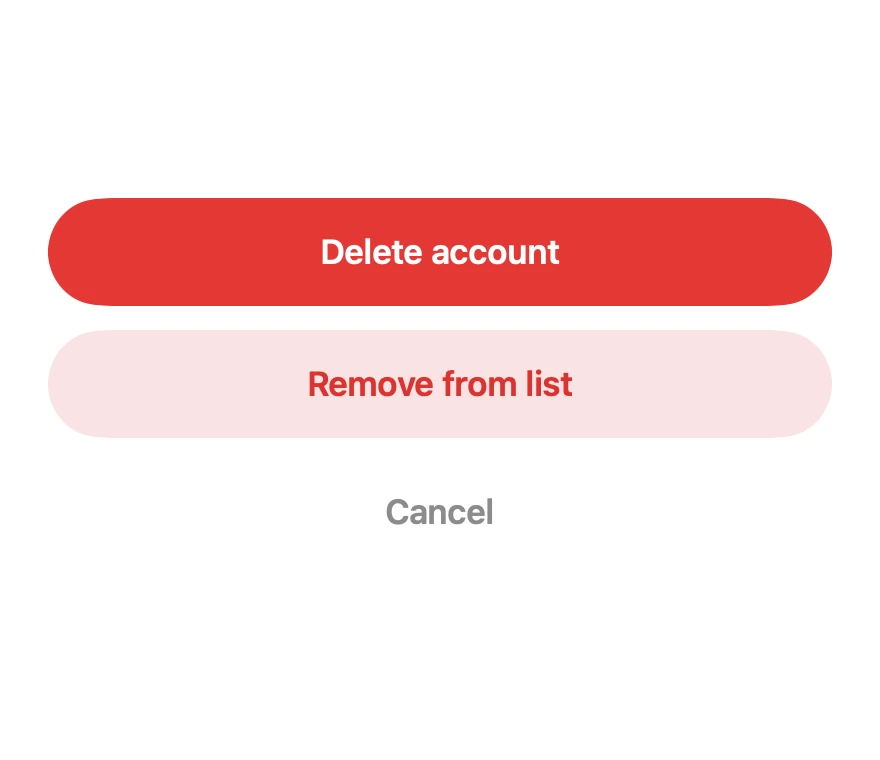
A three-weight confirmation stack for delete, remove, and cancel.
Buttons · SwiftUI · Flutter · iOS 17 · Flutter 3.16
- button
- destructive
- delete
- confirm
- alert
The actual source
DestructiveActions.swift
// Destructive Actions · syxUI · https://syxui.dev/components/destructive-actions
// Free in any project. Keep this line and credit syxUI where a person can read it.

import SwiftUI

/// A confirmation stack for irreversible actions.
///
/// Three levels of weight, so severity is legible before the label is read:
/// filled for the destructive commit, tinted for the reversible one, plain for
/// the way out. Cancel is deliberately last and unstyled.
struct DestructiveActions: View {
    var destructiveTitle: String = "Delete account"
    var secondaryTitle: String = "Remove from list"
    var cancelTitle: String = "Cancel"

    var onDestructive: () -> Void = {}
    var onSecondary: () -> Void = {}
    var onCancel: () -> Void = {}

    var body: some View {
        VStack(spacing: 12) {
            ActionRow(title: destructiveTitle,
                      foreground: .white,
                      background: Color(red: 0.90, green: 0.22, blue: 0.21),
                      action: onDestructive)

            ActionRow(title: secondaryTitle,
                      foreground: Color(red: 0.86, green: 0.20, blue: 0.19),
                      background: Color(red: 0.98, green: 0.89, blue: 0.89),
                      action: onSecondary)

            Button(action: onCancel) {
                Text(cancelTitle)
                    .font(.system(size: 17, weight: .semibold))
                    .foregroundStyle(Color(white: 0.55))
                    .frame(maxWidth: .infinity)
                    .frame(height: 50)
                    .contentShape(Rectangle())
            }
            .buttonStyle(.plain)
        }
    }
}

private struct ActionRow: View {
    let title: String
    let foreground: Color
    let background: Color
    let action: () -> Void

    var body: some View {
        Button(action: action) {
            Text(title)
                .font(.system(size: 17, weight: .semibold))
                .foregroundStyle(foreground)
                .frame(maxWidth: .infinity)
                .frame(height: 54)
                .background(background, in: Capsule(style: .continuous))
                .contentShape(Capsule(style: .continuous))
        }
        .buttonStyle(.plain)
    }
}

#Preview {
    DestructiveActions()
        .padding(30)
}
iOS 17 · No dependencies
SwiftUI note. Colours are literals rather than `.red` so the stack keeps the same weight relationship in both colour schemes.
Dependencies
- SwiftUI
- No external dependencies
- Flutter
- No external dependencies
Requires iOS 17
Requires Flutter 3.16