Relative Dates
From syxUI — written for both platforms, not translated between them.
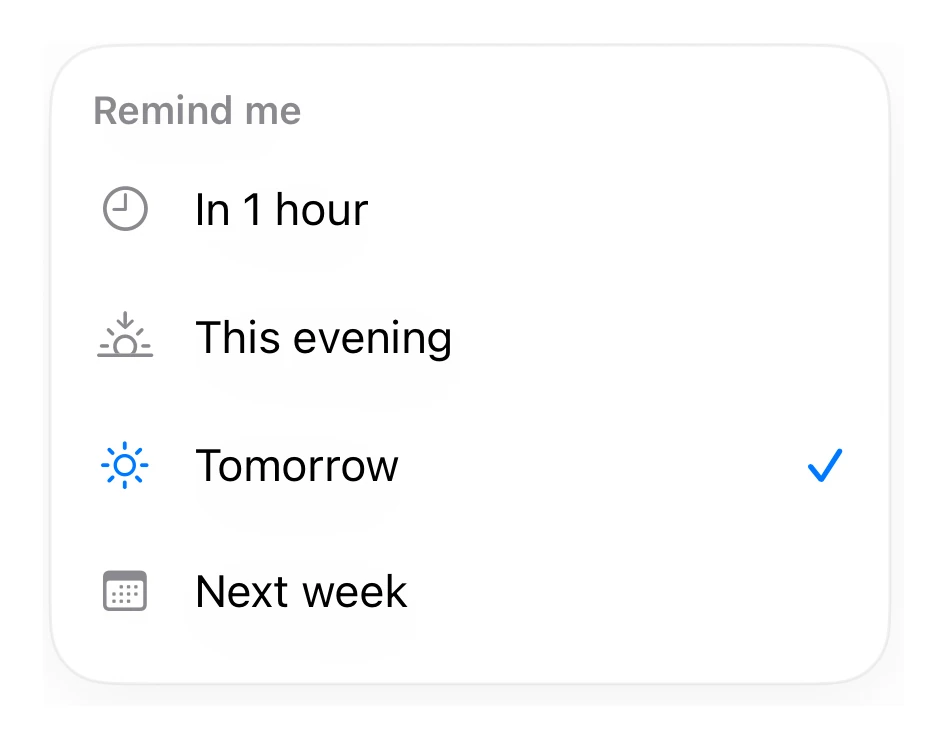
A relative reminder picker.
Inputs · SwiftUI · iOS 17
- inputs
- swiftui
The actual source
PickerRelative.swift
// Relative Dates · syxUI · https://syxui.dev/components/picker-relative
// Free in any project. Keep this line and credit syxUI where a person can read it.

import SwiftUI

let pkBlue = Color(red: 0.0, green: 0.47, blue: 1.0)

extension View {
    func formaCard(_ pad: CGFloat = 18) -> some View {
        self.padding(pad)
            .background(Color(.systemBackground), in: RoundedRectangle(cornerRadius: 20, style: .continuous))
            .overlay(RoundedRectangle(cornerRadius: 20, style: .continuous).stroke(Color.primary.opacity(0.06), lineWidth: 1))
            .shadow(color: .black.opacity(0.05), radius: 14, x: 0, y: 6)
    }
}

struct PickerRelative: View { var body: some View { VStack(alignment: .leading, spacing: 8) { Text("Remind me").font(.system(size: 13, weight: .semibold)).foregroundStyle(.secondary); ForEach(Array([("In 1 hour", "clock", false), ("This evening", "sunset", false), ("Tomorrow", "sun.max", true), ("Next week", "calendar", false)].enumerated()), id: \.offset) { _, r in HStack(spacing: 12) { Image(systemName: r.1).font(.system(size: 15)).foregroundStyle(r.2 ? pkBlue : .secondary).frame(width: 22); Text(r.0).font(.system(size: 15)); Spacer(); if r.2 { Image(systemName: "checkmark").font(.system(size: 13, weight: .semibold)).foregroundStyle(pkBlue) } }.padding(.vertical, 8) } }.formaCard(14).frame(width: 280) } }
iOS 17 · No dependencies
Dependencies
- SwiftUI
- No external dependencies
Requires iOS 17