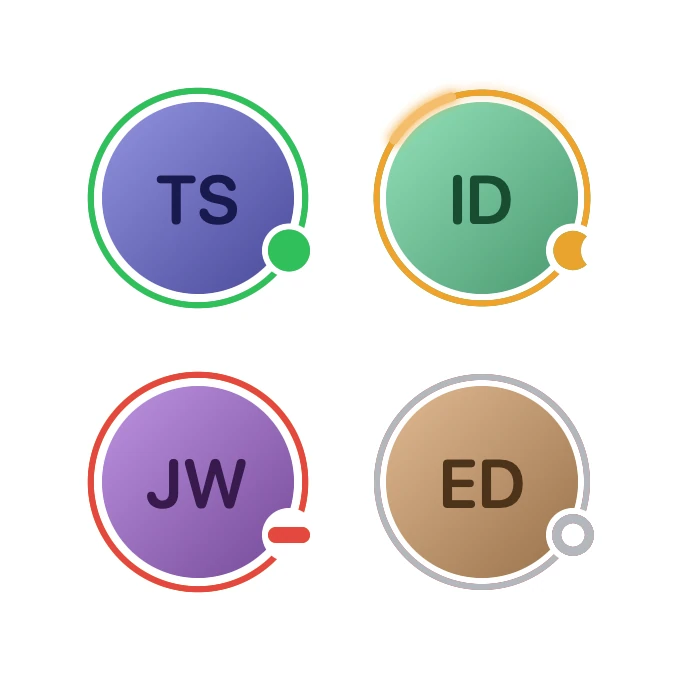
Presence Ring
From syxUI — written for both platforms, not translated between them.
A presence ring whose status badge morphs between online, away, busy and offline while a lap of light announces the change.
Avatars · SwiftUI · Flutter · iOS 17 · Flutter 3.27
- avatar
- presence
- status
- ring
- morph
- badge
- animated
The actual source
PresenceRing.swift
// Presence Ring · syxUI · https://syxui.dev/components/presence-ring
// Free in any project. Keep this line and credit syxUI where a person can read it.

import SwiftUI

/// An avatar with a presence ring whose badge morphs between four states.
///
/// The badge is one shape, not four icons. The dot squeezes into a bar for
/// busy, an occluding disc slides across it for away, and its fill drains into
/// a hollow stroke for offline — so every change is a shape travelling to
/// another shape. A 40° arc of light leaves the badge and runs one lap of the
/// ring to announce the change, over a 3% breath that keeps a live ring alive.
///
/// The whole frame is a pure function of one number, which is what lets the
/// catalog pin it to a single point of the cycle — and lets you scrub it.
struct PresenceRing: View {
    /// Diameter of the face. Everything else is a fraction of it, so this is
    /// the same drawing at 32 pt in a list and at 140 pt on a profile.
    var size: CGFloat = 96
    var ringWidth: CGFloat = 3
    /// Badge diameter as a fraction of `size`. A pt constant here would give
    /// you two different components at list scale and profile scale.
    var badgeScale: Double = 0.22
    /// Online, away, busy, offline — in that order.
    var statusColors: [Color] = [
        Color(red: 0.188, green: 0.753, blue: 0.357),
        Color(red: 0.941, green: 0.635, blue: 0.18),
        Color(red: 0.886, green: 0.282, blue: 0.247),
        Color(red: 0.702, green: 0.718, blue: 0.741),
    ]
    /// Seconds for one pass through all four states.
    var period: Double = 9
    /// How far the ring swells at the top of a breath, as a fraction of its
    /// radius. At 96 pt the default is about 1.4 pt of travel — enough to be
    /// felt, not enough to be watched.
    var breathAmount: Double = 0.03
    /// The face is generated from this string: the hue is a hash of it and the
    /// initials are the first letter of its first two words.
    var name: String = "Theo Silva"
    /// What the avatar sits on. The badge is punched out of the ring and the
    /// face in this colour, so it has to match the surface behind it.
    var surface: Color = Color(white: 1)
    /// Preview override. When set, the component renders that point of one
    /// cycle instead of driving its own clock.
    var phase: Double? = nil

    @Environment(\.accessibilityReduceMotion) private var reduceMotion

    var body: some View {
        Group {
            if let phase {
                content(at: phase)
            } else if reduceMotion {
                // Reduce Motion lands on the rest state — online, settled, and
                // at the bottom of the breath rather than frozen mid-swell.
                content(at: PresenceRingConstants.restPhase)
            } else {
                // One display-linked clock. Every curve in `PresenceDrive` is
                // analytic, so there is nothing for SwiftUI to interpolate and
                // nothing a pinned `phase` cannot reproduce exactly.
                TimelineView(.animation) { timeline in
                    content(at: PresenceRing.position(of: timeline.date, period: period))
                }
            }
        }
    }

    private func content(at t: Double) -> some View {
        let drive = PresenceDrive(t: t)

        return ZStack {
            faceContent
                .frame(width: size, height: size)
                .clipShape(Circle())

            ringLayer(drive)

            // The badge is punched clear of both the ring and the face, in the
            // surface colour, so it reads as part of the hardware rather than
            // a sticker laid on top of it.
            Circle()
                .fill(surface)
                .frame(width: cutRadius * 2, height: cutRadius * 2)
                .offset(x: badgeOffset.x, y: badgeOffset.y)

            badgeLayer(drive)
        }
        .frame(width: extent * 2, height: extent * 2)
        .accessibilityElement(children: .ignore)
        .accessibilityLabel(Text(name))
        .accessibilityValue(Text(PresenceRingConstants.statusNames[drive.to]))
    }

    /// The face.
    ///
    /// **This is the one view to replace for a real photo:** swap the body for
    /// `Image("ava").resizable().scaledToFill()` and the ring, the cut-out and
    /// the badge all still line up, because none of them measure it.
    private var faceContent: some View {
        let hue = presenceRingHue(name) / 360

        return ZStack {
            LinearGradient(
                colors: [
                    Color(hue: hue, saturation: 0.34, brightness: 0.88),
                    Color(hue: hue, saturation: 0.52, brightness: 0.60),
                ],
                startPoint: .topLeading,
                endPoint: .bottomTrailing
            )
            Text(presenceRingInitials(name))
                .font(.system(size: size * 0.354, weight: .semibold, design: .rounded))
                .foregroundStyle(Color(hue: hue, saturation: 0.66, brightness: 0.30))
        }
    }

    /// Ring, colour crossfade and lap of light, in one box that breathes as a
    /// whole — the arc has to swell with the ring or it separates from it.
    private func ringLayer(_ drive: PresenceDrive) -> some View {
        let box = size + 2 * (gap + ringWidth)
        // Gated by `hollow`: a disconnected ring should not look like it is
        // still drawing breath.
        let swell = 1 + breathAmount * drive.breath * (1 - drive.hollow)

        return ZStack {
            Circle().strokeBorder(colour(drive.from), lineWidth: ringWidth)
            Circle().strokeBorder(colour(drive.to), lineWidth: ringWidth)
                .opacity(drive.colourFade)
            lapLayer(drive)
        }
        .frame(width: box, height: box)
        .scaleEffect(swell)
    }

    /// The announcement.
    ///
    /// A 40° arc leaves the badge and runs one lap, eased so it accelerates
    /// through the far side and arrives back where it started as the change
    /// lands. The long faint tail is what keeps it reading as one travelling
    /// light instead of a strobe — at any sampled frame rate the tail overlaps
    /// the previous frame's head.
    private func lapLayer(_ drive: PresenceDrive) -> some View {
        let light = colour(drive.to)
        let head = drive.lapHead
        let core = PresenceLapShape(
            from: head + PresenceRingConstants.lapSweep,
            to: head,
            inset: ringWidth / 2
        )
        let tail = PresenceLapShape(
            from: head + PresenceRingConstants.tailSweep,
            to: head,
            inset: ringWidth / 2
        )

        return ZStack {
            tail.stroke(light, style: StrokeStyle(lineWidth: ringWidth * 1.5, lineCap: .round))
                .blur(radius: ringWidth * 0.9)
                .opacity(0.30)
            core.stroke(light, style: StrokeStyle(lineWidth: ringWidth * 2.2, lineCap: .round))
                .blur(radius: ringWidth * 0.8)
                .opacity(0.60)
            core.stroke(light, style: StrokeStyle(lineWidth: ringWidth * 1.45, lineCap: .round))
            // Lifting the whole arc toward white, at the same width, is what
            // makes it read as light: a saturated bloom around a blown-out
            // filament. A thin white core inside a coloured stroke instead
            // reads as a hairline split down the middle of the ring. Kept to
            // 0.30 because the offline grey has no headroom — lift that far
            // enough and the arc announcing "gone offline" turns white on
            // white and announces nothing.
            core.stroke(
                Color.white.opacity(0.30),
                style: StrokeStyle(lineWidth: ringWidth * 1.45, lineCap: .round)
            )
        }
        .opacity(drive.lapAlpha)
    }

    /// The badge: a fill that drains and a stroke that grows in as it does,
    /// each crossfading between the two status colours on the way.
    ///
    /// The two colours are stacked rather than interpolated because `Color` has
    /// no mix before iOS 18. Each pair is composited at full strength and only
    /// *then* faded — stacking two already-translucent layers instead averages
    /// them over the surface, which turns a red draining to grey into an opaque
    /// dusty pink.
    private func badgeLayer(_ drive: PresenceDrive) -> some View {
        let diameter = size * badgeScale
        let hollowWidth = max(diameter * 0.22 * drive.hollow, 0.01)
        let solid = PresenceBadgeShape(bar: drive.bar, crescent: drive.crescent, inset: 0)
        let hollow = PresenceBadgeShape(
            bar: drive.bar,
            crescent: drive.crescent,
            inset: hollowWidth / 2
        )

        return ZStack {
            ZStack {
                solid.fill(colour(drive.from))
                solid.fill(colour(drive.to)).opacity(drive.badgeFade)
            }
            .compositingGroup()
            .opacity(1 - drive.hollow)

            ZStack {
                hollow.stroke(colour(drive.from), lineWidth: hollowWidth)
                hollow.stroke(colour(drive.to), lineWidth: hollowWidth)
                    .opacity(drive.badgeFade)
            }
            .compositingGroup()
            .opacity(drive.hollow)
        }
        .frame(width: diameter, height: diameter)
        // 60 ms behind the ring's crossfade, and back to its own size: the badge
        // should look pushed by the ring, not simultaneous with it.
        .scaleEffect(1 - 0.08 * drive.squash)
        .offset(x: badgeOffset.x, y: badgeOffset.y)
    }

    /* ------------------------------------------------------------ geometry */

    /// Air between the face and the ring — a fraction, so it is not a hairline
    /// at 140 pt and not a chasm at 32.
    private var gap: CGFloat { size * 0.032 }

    /// Radius of the ring's centre-line, which is also where the badge sits.
    private var ringRadius: CGFloat { size / 2 + gap + ringWidth / 2 }

    /// The badge plus the ring-width halo punched around it.
    private var cutRadius: CGFloat { size * badgeScale / 2 + ringWidth }

    private var badgeOffset: CGPoint {
        let angle = PresenceRingConstants.badgeTurn * 2 * Double.pi
        return CGPoint(x: ringRadius * CGFloat(sin(angle)), y: ringRadius * CGFloat(-cos(angle)))
    }

    /// Half the layout box: whichever of the ring or the punched badge reaches
    /// furthest from the centre. Sizing the frame to hold the badge is what
    /// stops a `.clipShape` further up the tree from biting a corner off it.
    private var extent: CGFloat {
        max(
            size / 2 + gap + ringWidth,
            max(abs(badgeOffset.x), abs(badgeOffset.y)) + cutRadius
        )
    }

    private func colour(_ index: Int) -> Color {
        statusColors.isEmpty ? Color(white: 0.72) : statusColors[index % statusColors.count]
    }

    private static func position(of date: Date, period: Double) -> Double {
        let cycle = max(period, 0.5)
        let seconds = date.timeIntervalSinceReferenceDate
        return (seconds / cycle).truncatingRemainder(dividingBy: 1)
    }
}

/* ------------------------------------------------------------------- drive */

/// Everything one frame needs, derived from a single linear drive.
///
/// Analytic on purpose. `KeyframeAnimator` and `PhaseAnimator` cannot be pinned
/// to a `Double`, so a component built on them has no still — and out-of-step
/// tracks are exactly what those APIs make easy and a pinned frame impossible.
/// Here the colour, the lap, the glyph and the squash all fall out of one `u`.
private struct PresenceDrive {
    /// The state being left, and the state being entered.
    let from: Int
    let to: Int
    /// Ring colour crossfade — the fastest track, 0.24 s of a 0.68 s change.
    let colourFade: Double
    /// Badge colour, which travels with the shape rather than with the ring.
    let badgeFade: Double
    /// 0 = round dot, 1 = a 2.6:1 bar.
    let bar: Double
    /// 0 = whole disc, 1 = an occluder parked 0.42 diameters across it.
    let crescent: Double
    /// 0 = solid fill, 1 = hollow stroke.
    let hollow: Double
    /// Squash pulse: 0 → 1 → 0 across the change.
    let squash: Double
    /// Leading tip of the arc, in turns clockwise from twelve o'clock.
    let lapHead: Double
    let lapAlpha: Double
    /// 0 at rest, 1 at full swell. Four breaths a cycle — one per state, timed
    /// so the ring holds still while the arc runs and breathes during the dwell.
    let breath: Double

    /// Share of each quarter spent changing. The other 70% is the dwell, and
    /// the dwell is what makes a state read as a state rather than a waypoint.
    private static let changeSpan = 0.30
    private static let bars: [Double] = [0, 0, 1, 0]
    private static let crescents: [Double] = [0, 1, 0, 0]
    private static let hollows: [Double] = [0, 0, 0, 1]

    init(t: Double) {
        let wrapped = t - floor(t)
        let scaled = wrapped * 4
        let index = min(Int(scaled), 3)
        let u = min((scaled - Double(index)) / PresenceDrive.changeSpan, 1)

        to = index
        from = (index + 3) % 4

        colourFade = presenceRingEase(u, 0, 0.36)
        // Colour a shade behind the ring, shape well behind both. Letting the
        // badge's colour lag as far as its shape does only reads as mud —
        // half-green half-amber is olive, not "changing".
        badgeFade = presenceRingEase(u, 0.05, 0.44)

        let morph = presenceRingEase(u, 0.09, 0.62)
        bar = presenceRingLerp(PresenceDrive.bars[from], PresenceDrive.bars[to], morph)
        crescent = presenceRingLerp(
            PresenceDrive.crescents[from],
            PresenceDrive.crescents[to],
            morph
        )
        hollow = presenceRingLerp(PresenceDrive.hollows[from], PresenceDrive.hollows[to], morph)

        let pulse = min(max((u - 0.09) / 0.44, 0), 1)
        squash = sin(pulse * .pi)

        // One lap, counter-clockwise from the badge, so the light leaves the
        // thing that changed and returns to it.
        lapHead = PresenceRingConstants.badgeTurn - presenceRingEase(u, 0, 0.81)
        lapAlpha = presenceRingEase(u, 0, 0.05) * (1 - presenceRingEase(u, 0.74, 0.98))

        breath = (1 - cos(wrapped * 8 * .pi)) / 2
    }
}

/* ------------------------------------------------------------------ shapes */

/// The morphing badge.
///
/// Deliberately **not** `Animatable`: the drive is the single source of truth
/// and it already arrives once per display frame, so an `animatableData` here
/// would only add a second interpolator lagging behind the first.
private struct PresenceBadgeShape: Shape {
    /// 0 = round dot, 1 = a 2.6:1 bar. The width is held and the height
    /// squeezed, so the bar never grows out of the hole punched for it.
    var bar: Double
    /// 0 = whole, 1 = an occluding disc parked 0.42 diameters across, leaving
    /// a crescent 0.42 diameters thick at its widest.
    var crescent: Double
    /// Pulled in from every edge, so the hollow state's stroke sits inside the
    /// badge instead of straddling its outline.
    var inset: CGFloat

    private static let barRatio: Double = 2.6

    func path(in rect: CGRect) -> Path {
        let diameter = min(rect.width, rect.height)
        let height = diameter / (1 + (PresenceBadgeShape.barRatio - 1) * bar)
        let box = CGRect(
            x: rect.midX - diameter / 2 + inset,
            y: rect.midY - height / 2 + inset,
            width: max(diameter - inset * 2, 0.01),
            height: max(height - inset * 2, 0.01)
        )
        var path = Path(roundedRect: box, cornerRadius: box.height / 2)

        if crescent > 0.001 {
            // Slides in from clear of the badge to 0.42 diameters across it.
            let shift = diameter * (1.16 - 0.74 * crescent)
            let occluder = CGRect(
                x: rect.midX - diameter / 2 + shift,
                y: rect.midY - diameter / 2,
                width: diameter,
                height: diameter
            )
            path = path.subtracting(Path(ellipseIn: occluder))
        }

        return path
    }
}

/// An arc of the inscribed circle, from one turn to another.
///
/// Sampled rather than built with `Path.addArc` because that call's
/// `clockwise:` flag reads inverted in SwiftUI's flipped coordinate space, and
/// a polyline leaves no doubt which way the light runs. 36 segments over 40°
/// puts the chord error under a hundredth of a point.
private struct PresenceLapShape: Shape {
    /// Turns clockwise from twelve o'clock.
    var from: Double
    var to: Double
    var inset: CGFloat

    func path(in rect: CGRect) -> Path {
        let radius = min(rect.width, rect.height) / 2 - inset
        let centre = CGPoint(x: rect.midX, y: rect.midY)
        let steps = 36
        var path = Path()

        for step in 0...steps {
            let turn = from + (to - from) * Double(step) / Double(steps)
            let angle = turn * 2 * Double.pi
            let point = CGPoint(
                x: centre.x + radius * CGFloat(sin(angle)),
                y: centre.y - radius * CGFloat(cos(angle))
            )
            if step == 0 {
                path.move(to: point)
            } else {
                path.addLine(to: point)
            }
        }

        return path
    }
}

/* ----------------------------------------------------------------- helpers */

/// Fixed geometry, shared by the view and its drive.
private enum PresenceRingConstants {
    /// Four o'clock, in turns clockwise from twelve.
    static let badgeTurn = 120.0 / 360.0
    /// 40°: long enough to read as a stroke of light, short enough to be a
    /// comet rather than a sweep.
    static let lapSweep = 40.0 / 360.0
    static let tailSweep = 105.0 / 360.0
    /// Online, settled, breath at the bottom of its swing.
    static let restPhase = 0.24
    static let statusNames = ["online", "away", "busy", "offline"]
}

/// Smoothstep between two points of a drive — the one shaping function every
/// out-of-step track above is built from.
private func presenceRingEase(_ t: Double, _ start: Double, _ end: Double) -> Double {
    guard end > start else { return t >= end ? 1 : 0 }
    let x = min(max((t - start) / (end - start), 0), 1)
    return x * x * (3 - 2 * x)
}

private func presenceRingLerp(_ a: Double, _ b: Double, _ t: Double) -> Double {
    a + (b - a) * t
}

/// FNV-1a over the name's UTF-8. Same name, same hue, on both platforms and
/// across launches, with nothing stored and no asset shipped.
private func presenceRingHue(_ name: String) -> Double {
    var hash: UInt64 = 0xcbf2_9ce4_8422_2325
    for byte in name.utf8 {
        hash = (hash ^ UInt64(byte)) &* 0x100_0000_01b3
    }
    // Masked to 32 bits before the modulo. Swift's UInt64 remainder and Dart's
    // signed-int remainder disagree for every name whose top bit is set —
    // about half of them — so without this the same person is a different
    // colour on iOS and on Android.
    return Double((hash & 0xFFFF_FFFF) % 360)
}

private func presenceRingInitials(_ name: String) -> String {
    let letters = name.split(separator: " ").prefix(2).compactMap(\.first)
    return letters.isEmpty ? "?" : letters.map { String($0) }.joined().uppercased()
}

#Preview {
    PresenceRing()
        .padding(40)
}
iOS 17 · No dependencies
SwiftUI note. The face is the `faceContent` view — replace its gradient and initials with `Image("ava").resizable().scaledToFill()` for a real photo and nothing else moves. Set `surface` to whatever the avatar sits on, because the badge is punched out of the ring in that colour. Each instance runs its own `TimelineView`, so for a roster hoist one clock to the parent and pass `phase` down.
Dependencies
- SwiftUI
- No external dependencies
- Flutter
- No external dependencies
Requires iOS 17
Requires Flutter 3.27