Holographic Foil
From syxUI — written for both platforms, not translated between them.
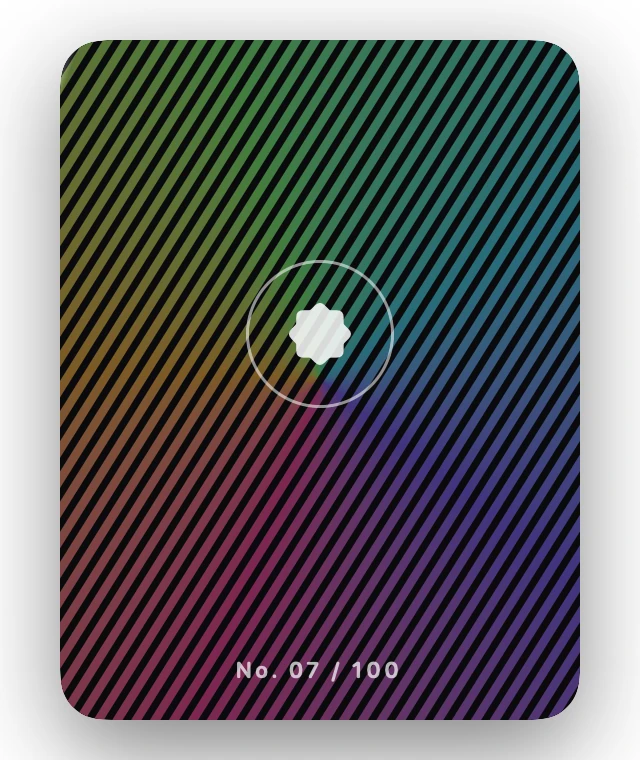
InteractiveA trading-card foil where a striped rainbow rolls across the surface as the card tilts.
Cards · SwiftUI · Flutter · iOS 17 · Flutter 3.27
- card
- holographic
- foil
- iridescent
- gradient
- tilt
- specular
- collectible
The actual source
DepthHoloFoil.swift
// Holographic Foil · syxUI · https://syxui.dev/components/depth-holo-foil
// Free in any project. Keep this line and credit syxUI where a person can read it.

import SwiftUI

/// A trading-card foil where a striped rainbow rolls across the surface as
/// the card tilts.
///
/// One `sweep: Double` drives three things at different rates: the angular
/// gradient's rotation (0…220°), the diagonal stripe mask that gates it
/// (offset 2.5 stripe widths), and a specular streak crossing at **twice**
/// the rate. The two rates beating against each other is what reads as foil
/// rather than a rainbow gradient sliding underneath glass.
struct DepthHoloFoil: View {
    /// Repeat the first hue as the last stop or the wrap shows as a seam.
    var hues: [Color] = [Color(red: 1.0, green: 0.239, blue: 0.604), Color(red: 1.0, green: 0.69, blue: 0.227), Color(red: 0.486, green: 1.0, blue: 0.42), Color(red: 0.259, green: 0.851, blue: 0.961), Color(red: 0.486, green: 0.361, blue: 1.0), Color(red: 1.0, green: 0.239, blue: 0.604)]
    var surface: Color = Color(red: 0.039, green: 0.039, blue: 0.047)
    var stripeWidth: CGFloat = 8
    var stripeAngle: Double = 32
    var intensity: Double = 0.45
    /// Degrees of rotation at full deflection, either axis.
    var maxTilt: Double = 8
    /// Preview override. When set, the component renders that point of one
    /// sweep instead of waiting for a drag.
    var phase: Double? = nil

    @Environment(\.accessibilityReduceMotion) private var reduceMotion
    @State private var interactiveSweep: Double = 0.5

    private let cardWidth: CGFloat = 260
    private let cardHeight: CGFloat = 340
    private let corner: CGFloat = 22

    private var sweep: Double {
        guard !reduceMotion else { return 0.5 }
        return phase ?? interactiveSweep
    }
    /// The specular streak runs at twice the gradient's rate, wrapping on
    /// itself — it is what makes the two layers beat against each other.
    private var specularSweep: Double { (2 * sweep).truncatingRemainder(dividingBy: 1) }
    private var tiltY: Double { (sweep - 0.5) * 2 * maxTilt }
    private var tiltX: Double { (0.5 - sweep) * maxTilt * 0.4 }

    private var shape: RoundedRectangle {
        RoundedRectangle(cornerRadius: corner, style: .continuous)
    }

    var body: some View {
        cardBody
            .rotation3DEffect(.degrees(tiltY), axis: (x: 0, y: 1, z: 0), perspective: 0.7)
            .rotation3DEffect(.degrees(tiltX), axis: (x: 1, y: 0, z: 0), perspective: 0.7)
            .shadow(color: .black.opacity(0.5), radius: 24, x: 0, y: 14)
            .gesture(dragGesture)
            .accessibilityElement(children: .combine)
            .accessibilityLabel("Holographic foil card, No. 07 of 100")
    }

    private var cardBody: some View {
        ZStack {
            shape.fill(surface)

            AngularGradient(colors: hues, center: .center, angle: .degrees(220 * sweep))
                .mask(stripeMask)
                .blendMode(.plusLighter)
                .opacity(intensity)

            specularStreak
                .blendMode(.plusLighter)

            content
        }
        .frame(width: cardWidth, height: cardHeight)
        .clipShape(shape)
        .compositingGroup()
    }

    /// Diagonal bars at a 55% duty cycle: filled area shows the gradient
    /// through, gaps show raw surface — the alternation is what sells "foil
    /// stamped through a stencil" instead of a plain gradient wash.
    private var stripeMask: some View {
        Canvas { context, size in
            context.translateBy(x: size.width / 2, y: size.height / 2)
            context.rotate(by: .degrees(stripeAngle))

            let period = max(stripeWidth, 1)
            let bar = period * 0.55
            let travel = sweep * 2.5 * stripeWidth
            let diagonal = hypot(size.width, size.height)
            var x = -diagonal - travel.truncatingRemainder(dividingBy: period)
            while x < diagonal {
                let rect = CGRect(x: x, y: -diagonal, width: bar, height: diagonal * 2)
                context.fill(Path(rect), with: .color(.white))
                x += period
            }
        }
    }

    private var specularStreak: some View {
        GeometryReader { proxy in
            let w = proxy.size.width
            let h = proxy.size.height
            let x = -0.25 * w + 1.5 * w * specularSweep
            Rectangle()
                .fill(
                    LinearGradient(
                        colors: [.clear, .white.opacity(0.75), .clear],
                        startPoint: .leading,
                        endPoint: .trailing
                    )
                )
                .frame(width: 26, height: h * 2.6)
                .rotationEffect(.degrees(stripeAngle - 12))
                .position(x: x, y: h / 2)
        }
        .mask(shape)
        .allowsHitTesting(false)
    }

    private var content: some View {
        VStack(spacing: 14) {
            Spacer()
            Circle()
                .strokeBorder(.white.opacity(0.55), lineWidth: 1.5)
                .frame(width: 74, height: 74)
                .overlay {
                    Image(systemName: "seal.fill")
                        .font(.system(size: 28))
                        .foregroundStyle(.white.opacity(0.85))
                }
            Spacer()
            Text("No. 07 / 100")
                .font(.system(size: 11, weight: .semibold, design: .rounded))
                .tracking(1.5)
                .foregroundStyle(.white.opacity(0.7))
                .padding(.bottom, 18)
        }
    }

    // MARK: Input

    private var dragGesture: some Gesture {
        DragGesture(minimumDistance: 0)
            .onChanged { value in
                guard phase == nil, !reduceMotion else { return }
                withAnimation(.interactiveSpring(response: 0.15, dampingFraction: 0.9)) {
                    interactiveSweep = min(max(0.5 + value.translation.width / cardWidth, 0), 1)
                }
            }
            .onEnded { _ in
                guard phase == nil, !reduceMotion else { return }
                withAnimation(.spring(response: 0.5, dampingFraction: 0.7)) {
                    interactiveSweep = 0.5
                }
            }
    }
}

#Preview {
    DepthHoloFoil()
        .frame(width: 320, height: 380)
        .background(Color(white: 0.05))
}
iOS 17 · No dependencies
SwiftUI note. The stripe mask is redrawn every frame in a Canvas, so a very small stripeWidth on a large card is the thing to raise first if you see frame drops. Drag settles back to a neutral sweep of 0.5 on release; the phase override samples one full sweep for the catalog card.
Dependencies
- SwiftUI
- No external dependencies
- Flutter
- No external dependencies
Requires iOS 17
Requires Flutter 3.27