Parallax Layers
From syxUI — written for both platforms, not translated between them.
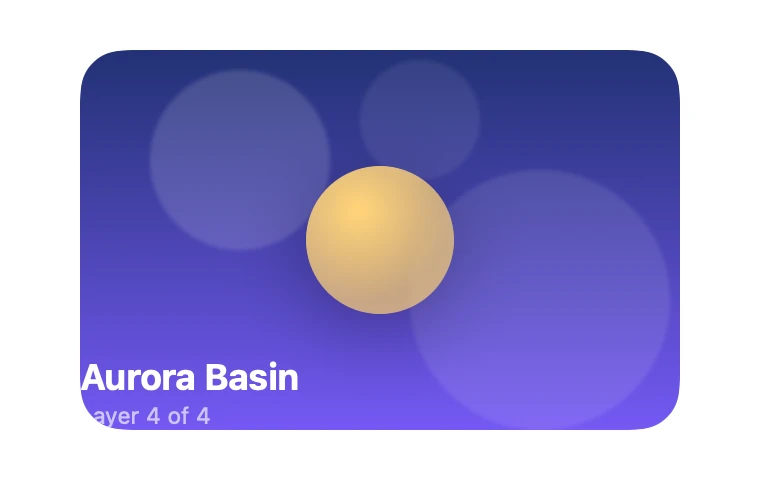
InteractiveA card built from four layers that slide at different rates, turning a flat tile into a diorama.
Cards · SwiftUI · Flutter · iOS 17 · Flutter 3.27
- card
- parallax
- layers
- depth
- scroll
- drag
- diorama
- 3d
The actual source
// Parallax Layers · syxUI · https://syxui.dev/components/depth-parallax-layers
// Free in any project. Keep this line and credit syxUI where a person can read it.

import SwiftUI

/// A card built from four layers that slide at different rates, turning a
/// flat tile into a diorama.
///
/// One normalised `input` in −1…1 drives everything: sky `×−0.08`, mid shape
/// cluster `×−0.02`, subject `×+0.06`, foreground text `×+0.14`, each times
/// `depth`. The subject also scales up slightly and its shadow shifts the
/// *opposite* way — the counter-moving shadow is what reads as "the subject
/// is off the back plate" rather than just a sticker sliding on the surface.
struct DepthParallaxLayers: View {
    var skyA: Color = Color(red: 0.106, green: 0.18, blue: 0.42)
    var skyB: Color = Color(red: 0.486, green: 0.361, blue: 1.0)
    var subjectColor: Color = Color(red: 1.0, green: 0.827, blue: 0.478)
    var textColor: Color = Color(white: 1.0)
    /// How far the foreground layer slides, in points. The other three
    /// layers move at their own fraction of this.
    var depth: CGFloat = 26
    var mode: ParallaxMode = .drag
    /// Preview override. When set, the component renders that point of the
    /// idle sweep instead of waiting for drag or scroll.
    var phase: Double? = nil

    @Environment(\.accessibilityReduceMotion) private var reduceMotion
    @State private var interactiveInput: Double = 0

    private let cardWidth: CGFloat = 300
    private let cardHeight: CGFloat = 190
    private let corner: CGFloat = 22

    /// The idle sweep: one full lap of `sin(2πt)` crosses the whole −1…1
    /// range, so a still frame never lands on the flat, unrevealing centre.
    private var input: Double {
        guard !reduceMotion else { return 0 }
        if let phase { return sin(2 * .pi * phase) }
        return interactiveInput
    }

    private var shape: RoundedRectangle {
        RoundedRectangle(cornerRadius: corner, style: .continuous)
    }

    var body: some View {
        ZStack {
            skyLayer.offset(x: input * -0.08 * depth)
            midShapesLayer.offset(x: input * -0.02 * depth)
            subjectLayer.offset(x: input * 0.06 * depth)
            textLayer.offset(x: input * 0.14 * depth)
        }
        .frame(width: cardWidth, height: cardHeight)
        .clipShape(shape)
        .rotation3DEffect(.degrees(input * 6), axis: (x: 0, y: 1, z: 0), perspective: 0.7)
        .contentShape(shape)
        .gesture(dragGesture, including: mode == .drag ? .all : .subviews)
        .onContinuousHover(coordinateSpace: .local, perform: handleHover)
        .background {
            // Scroll mode reads the card's own position in its enclosing
            // scroll view; outside one, minY is always 0 and the card just
            // sits centred, which is the correct graceful degradation.
            GeometryReader { proxy in
                Color.clear.preference(key: ScrollInputKey.self, value: scrollInput(for: proxy))
            }
        }
        .onPreferenceChange(ScrollInputKey.self) { value in
            guard mode == .scroll, phase == nil, !reduceMotion else { return }
            interactiveInput = value
        }
        .accessibilityElement(children: .combine)
        .accessibilityLabel("Parallax diorama card")
    }

    // MARK: Layers

    private var skyLayer: some View {
        LinearGradient(colors: [skyA, skyB], startPoint: .top, endPoint: .bottom)
    }

    private var midShapesLayer: some View {
        ZStack {
            Circle().fill(.white.opacity(0.14)).frame(width: 90, height: 90).offset(x: -70, y: -40)
            Circle().fill(.white.opacity(0.1)).frame(width: 130, height: 130).offset(x: 80, y: 30)
            Circle().fill(.white.opacity(0.08)).frame(width: 60, height: 60).offset(x: 20, y: -60)
        }
        .blur(radius: 1)
    }

    private var subjectLayer: some View {
        let magnitude = min(1, abs(input))
        return Circle()
            .fill(
                RadialGradient(
                    colors: [subjectColor, subjectColor.opacity(0.7)],
                    center: .init(x: 0.35, y: 0.3),
                    startRadius: 2,
                    endRadius: 46
                )
            )
            .frame(width: 74, height: 74)
            .scaleEffect(1 + 0.04 * magnitude)
            // Shifting opposite the subject's own slide is what sells "this
            // is a separate plane, not a sticker on the background."
            .shadow(color: .black.opacity(0.35), radius: 20, x: -input * 12, y: 10)
    }

    private var textLayer: some View {
        VStack(alignment: .leading, spacing: 2) {
            Spacer()
            Text("Aurora Basin")
                .font(.system(size: 18, weight: .bold))
                .foregroundStyle(textColor)
            Text("Layer 4 of 4")
                .font(.system(size: 11.5))
                .foregroundStyle(textColor.opacity(0.65))
        }
        .frame(width: cardWidth, height: cardHeight, alignment: .bottomLeading)
        .padding(16)
    }

    /// Normalised position of this card within its enclosing scroll view,
    /// −1…1: negative once scrolled past, positive while still approaching.
    private func scrollInput(for proxy: GeometryProxy) -> Double {
        let minY = proxy.frame(in: .scrollView).minY
        let height = max(proxy.size.height, 1)
        return min(max(minY / height, -1), 1)
    }

    // MARK: Input

    private var dragGesture: some Gesture {
        DragGesture(minimumDistance: 0)
            .onChanged { value in
                guard phase == nil, !reduceMotion, mode == .drag else { return }
                track(value.translation.width / (cardWidth / 2))
            }
            .onEnded { _ in settle() }
    }

    /// Mouse and trackpad have no drag gesture until a button is held, so a
    /// Mac cursor would never move this card without this — hover writes the
    /// same property the finger does, with the same spring underneath.
    private func handleHover(_ hoverPhase: HoverPhase) {
        guard phase == nil, !reduceMotion, mode == .drag else { return }
        switch hoverPhase {
        case .active(let location):
            track((location.x - cardWidth / 2) / (cardWidth / 2))
        case .ended:
            settle()
        }
    }

    private func track(_ value: Double) {
        withAnimation(.interactiveSpring(response: 0.15, dampingFraction: 0.9)) {
            interactiveInput = min(max(value, -1), 1)
        }
    }

    private func settle() {
        guard phase == nil, !reduceMotion, mode == .drag else { return }
        withAnimation(.spring(response: 0.55, dampingFraction: 0.70)) {
            interactiveInput = 0
        }
    }
}

enum ParallaxMode {
    case drag
    case scroll
}

private struct ScrollInputKey: PreferenceKey {
    // A mutable `static var` default is shared mutable state under Swift 6's
    // strict concurrency checking — `static let` is correct because a
    // PreferenceKey's default never changes.
    static let defaultValue: Double = 0
    static func reduce(value: inout Double, nextValue: () -> Double) {
        value = nextValue()
    }
}

#Preview {
    DepthParallaxLayers()
        .frame(width: 380, height: 240)
        .background(Color(white: 0.08))
}
SwiftUI note. Drag mode is dead flat without touch, so the phase override drives a sin(2πt) sweep across the whole input range for the catalog card, and onContinuousHover writes the same property the drag gesture does so a Mac cursor works too. Scroll mode reads proxy.frame(in: .scrollView) via a PreferenceKey rather than a GeometryReader-plus-@State write during layout; .scrollTransition(.interactive) is a terser alternative worth trying if you only need this on iOS 17+ inside a List or ScrollView.
Dependencies
- SwiftUI
- No external dependencies
- Flutter
- No external dependencies
Requires iOS 17
Requires Flutter 3.27