Spotlight Rim
From syxUI — written for both platforms, not translated between them.
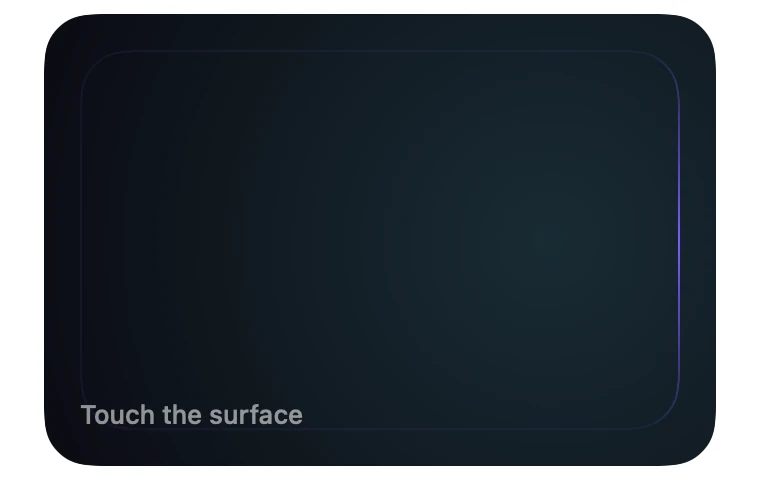
InteractiveA dark card whose border only lights up where your finger is, with a soft glow inside.
Cards · SwiftUI · Flutter · iOS 17 · Flutter 3.27
- card
- border
- spotlight
- glow
- hover
- follow
- rim-light
- dark
The actual source
DepthSpotlightRim.swift
// Spotlight Rim · syxUI · https://syxui.dev/components/depth-spotlight-rim
// Free in any project. Keep this line and credit syxUI where a person can read it.

import SwiftUI

/// A dark card whose border only lights up where your finger is, with a soft
/// glow inside that follows the same point.
///
/// Positional and touch-driven — different from `spotlight` (a full-screen
/// sweeping background) and from `depth-conic-rim` (a fixed-rate rotation
/// with no input). One `UnitPoint`, the hot spot, drives both the angle a
/// bright arc of the border gradient points at and the centre of an inner
/// radial glow. Idle, the hot spot orbits an ellipse so the card never goes
/// completely dark.
struct DepthSpotlightRim: View {
    var rimColor: Color = Color(red: 0.486, green: 0.361, blue: 1.0)
    var glowColor: Color = Color(red: 0.431, green: 0.906, blue: 0.976)
    var surface: Color = Color(red: 0.043, green: 0.051, blue: 0.078)
    var arcWidth: Double = 70
    var glowRadius: CGFloat = 260
    /// Seconds for one lap of the idle orbit. Zero disables it.
    var idlePeriod: Double = 8
    /// Preview override. When set, the component renders that point of the
    /// idle orbit instead of driving its own clock.
    var phase: Double? = nil

    @Environment(\.accessibilityReduceMotion) private var reduceMotion
    @State private var orbitPhase: Double = 0
    @State private var trackedPoint: UnitPoint? = nil

    private let cardWidth: CGFloat = 300
    private let cardHeight: CGFloat = 190
    private let corner: CGFloat = 24

    private var hotSpot: UnitPoint {
        if reduceMotion { return orbitPoint(at: 0) }
        if let phase { return orbitPoint(at: phase) }
        if let trackedPoint { return trackedPoint }
        return orbitPoint(at: orbitPhase)
    }

    /// Angle from the card's centre to the hot spot, in degrees — this is
    /// what the border gradient rotates to.
    private var theta: Double {
        atan2(hotSpot.y - 0.5, hotSpot.x - 0.5) * 180 / .pi
    }

    /// A bright point at the wrap (location 0 == location 1, the same
    /// physical angle once rotated), fading to a near-invisible 0.08 alpha
    /// through the middle — the outline never fully disappears.
    private var arcStops: [Gradient.Stop] {
        let half = min(0.5, (arcWidth / 360) / 2)
        return [
            .init(color: rimColor, location: 0),
            .init(color: rimColor.opacity(0.08), location: half),
            .init(color: rimColor.opacity(0.08), location: 1 - half),
            .init(color: rimColor, location: 1),
        ]
    }

    private var shape: RoundedRectangle {
        RoundedRectangle(cornerRadius: corner, style: .continuous)
    }

    var body: some View {
        ZStack {
            shape.fill(surface)
            RadialGradient(
                colors: [glowColor.opacity(0.14), .clear],
                center: hotSpot,
                startRadius: 0,
                endRadius: glowRadius
            )
            .clipShape(shape)
            content
        }
        .frame(width: cardWidth, height: cardHeight)
        .overlay {
            shape.strokeBorder(
                AngularGradient(stops: arcStops, center: .center, angle: .degrees(theta)),
                lineWidth: 1
            )
        }
        .contentShape(shape)
        .gesture(dragGesture)
        .onContinuousHover(coordinateSpace: .local, perform: handleHover)
        .onAppear(perform: startOrbit)
        .accessibilityElement(children: .combine)
        .accessibilityLabel("Spotlight rim card, glow follows touch")
    }

    private var content: some View {
        VStack(alignment: .leading, spacing: 4) {
            Spacer()
            Image(systemName: "hand.point.up.left.fill")
                .font(.system(size: 15))
                .foregroundStyle(.white.opacity(0.4))
            Text("Touch the surface")
                .font(.system(size: 13, weight: .medium))
                .foregroundStyle(.white.opacity(0.55))
        }
        .frame(width: cardWidth, height: cardHeight, alignment: .bottomLeading)
        .padding(18)
    }

    private func orbitPoint(at t: Double) -> UnitPoint {
        let angle = 2 * Double.pi * t
        return UnitPoint(x: 0.5 + 0.25 * cos(angle), y: 0.5 + 0.175 * sin(angle))
    }

    // MARK: Input

    private var dragGesture: some Gesture {
        DragGesture(minimumDistance: 0)
            .onChanged { value in track(value.location) }
            .onEnded { _ in release() }
    }

    /// The same math that answers a finger also answers a Mac cursor — this
    /// is the whole reason the effect is expressed as a point rather than a
    /// touch-only gesture.
    private func handleHover(_ hoverPhase: HoverPhase) {
        switch hoverPhase {
        case .active(let location): track(location)
        case .ended: release()
        }
    }

    private func track(_ location: CGPoint) {
        guard phase == nil, !reduceMotion else { return }
        let point = UnitPoint(
            x: min(max(location.x / cardWidth, 0), 1),
            y: min(max(location.y / cardHeight, 0), 1)
        )
        // Critically damped: it trails smoothly and never overshoots past
        // the finger, which an underdamped spring would.
        withAnimation(.spring(response: 0.28, dampingFraction: 1.0)) {
            trackedPoint = point
        }
    }

    private func release() {
        guard phase == nil, !reduceMotion else { return }
        withAnimation(.spring(response: 0.28, dampingFraction: 1.0)) {
            trackedPoint = nil
        }
    }

    private func startOrbit() {
        guard phase == nil, !reduceMotion, idlePeriod > 0 else { return }
        withAnimation(.linear(duration: idlePeriod).repeatForever(autoreverses: false)) {
            orbitPhase = 1
        }
    }
}

#Preview {
    DepthSpotlightRim()
        .frame(width: 380, height: 240)
        .background(Color(white: 0.02))
}
iOS 17 · No dependencies
SwiftUI note. onContinuousHover and the drag gesture write the same tracked point, so a Mac cursor lights the rim exactly like a finger would. Set idlePeriod to 0 to disable the idle orbit entirely and leave the rim dark until touched.
Dependencies
- SwiftUI
- No external dependencies
- Flutter
- No external dependencies
Requires iOS 17
Requires Flutter 3.27