Perspective Tilt
From syxUI — written for both platforms, not translated between them.
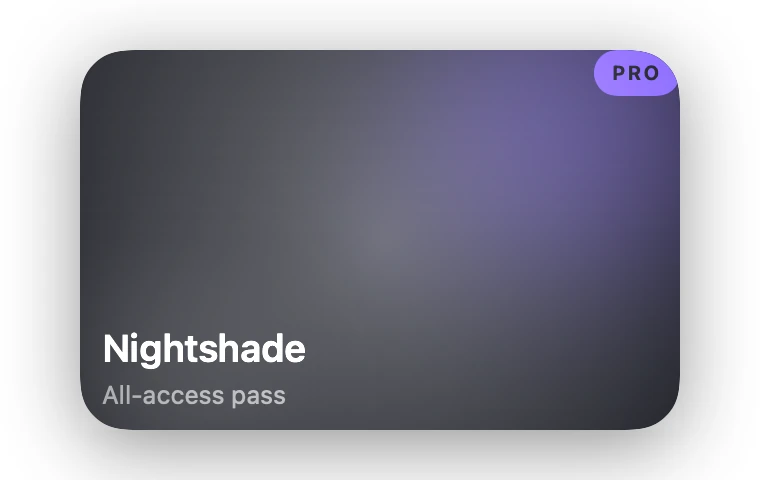
InteractiveA card that tilts under your finger with layered depth and a specular highlight that tracks it.
Cards · SwiftUI · Flutter · iOS 17 · Flutter 3.27
- card
- 3d
- tilt
- perspective
- parallax
- gloss
- drag
- depth
The actual source
DepthTilt.swift
// Perspective Tilt · syxUI · https://syxui.dev/components/depth-tilt
// Free in any project. Keep this line and credit syxUI where a person can read it.

import SwiftUI

/// A card that tilts under your finger, its layers sliding against the tilt to
/// read as a diorama instead of a flat plane rotating in place.
///
/// One normalised drag vector (`nx, ny`, each −1…1) drives everything: the two
/// rotation axes, three layers offset at different rates, a specular highlight
/// that slides to the far side of the tilt, and a shadow that grows and slides
/// opposite it. No layout ever changes size, so the whole thing is offsets and
/// a rotation matrix.
struct DepthTilt: View {
    var surface: Color = Color(red: 0.078, green: 0.086, blue: 0.11)
    var accent: Color = Color(red: 0.486, green: 0.361, blue: 1.0)
    var gloss: Color = Color(white: 1.0)
    /// Degrees of rotation at full deflection, either axis.
    var maxTilt: Double = 12
    /// How far the foreground layer slides against the tilt, in points. The
    /// title and background art move at 0.55× and 0.15× of this.
    var depth: CGFloat = 18
    var glossOpacity: Double = 0.35
    /// Preview override. When set, the component renders a Lissajous sweep of
    /// the tilt space instead of waiting for a finger or a cursor.
    var phase: Double? = nil

    @Environment(\.accessibilityReduceMotion) private var reduceMotion
    @State private var interactiveX: Double = 0
    @State private var interactiveY: Double = 0

    private let cardWidth: CGFloat = 300
    private let cardHeight: CGFloat = 190
    private let corner: CGFloat = 24

    /// The figure-8 idle path: `sin(2πt)` and `sin(4πt)` sweep every corner of
    /// the tilt space in one loop, so a still frame never looks arbitrary.
    private var nx: Double {
        guard !reduceMotion else { return 0 }
        if let phase { return sin(2 * .pi * phase) }
        return interactiveX
    }
    private var ny: Double {
        guard !reduceMotion else { return 0 }
        if let phase { return sin(4 * .pi * phase) }
        return interactiveY
    }

    private var rotY: Double { nx * maxTilt }
    private var rotX: Double { -ny * maxTilt }
    private var magnitude: Double { min(1, (nx * nx + ny * ny).squareRoot()) }

    private var shape: RoundedRectangle {
        RoundedRectangle(cornerRadius: corner, style: .continuous)
    }

    var body: some View {
        cardBody
            // Y first, then X — chaining two 3D rotations (rather than one
            // compound axis) is what keeps top and side edges reading as
            // straight lines instead of skewing into a rhombus.
            .rotation3DEffect(.degrees(rotY), axis: (x: 0, y: 1, z: 0), anchor: .center, anchorZ: 0, perspective: 0.7)
            .rotation3DEffect(.degrees(rotX), axis: (x: 1, y: 0, z: 0), anchor: .center, anchorZ: 0, perspective: 0.7)
            .shadow(color: .black.opacity(0.42), radius: 20 + 14 * magnitude, x: -nx * 12, y: 8 - ny * 14)
            .contentShape(shape)
            .gesture(dragGesture)
            .onContinuousHover(coordinateSpace: .local, perform: handleHover)
            .accessibilityElement(children: .combine)
            .accessibilityLabel("Nightshade all-access pass, tilts toward the cursor or your finger")
    }

    private var cardBody: some View {
        ZStack {
            shape.fill(surface)
            // Interior lift so the surface reads as lit from above, not flat ink.
            shape.fill(
                LinearGradient(colors: [.white.opacity(0.05), .clear], startPoint: .top, endPoint: .center)
            )

            backgroundArt
                .offset(layerOffset(0.15))

            VStack(alignment: .leading, spacing: 4) {
                Text("Nightshade")
                    .font(.system(size: 19, weight: .semibold))
                    .foregroundStyle(.white)
                Text("All-access pass")
                    .font(.system(size: 12.5))
                    .foregroundStyle(.white.opacity(0.5))
            }
            .frame(width: cardWidth, height: cardHeight, alignment: .bottomLeading)
            .padding(.leading, 22)
            .padding(.bottom, 20)
            .offset(layerOffset(0.55))

            badge
                .frame(width: cardWidth, height: cardHeight, alignment: .topTrailing)
                .padding(16)
                .offset(layerOffset(1.0))
        }
        .frame(width: cardWidth, height: cardHeight)
        .clipShape(shape)
        .overlay {
            // The highlight sits at the inverse of the tilt vector: as the
            // card leans one way, the glint slides to the opposite corner,
            // the way a real reflective surface answers a change of angle.
            RadialGradient(
                colors: [gloss.opacity(glossOpacity), .clear],
                center: UnitPoint(x: 0.5 - nx * 0.4, y: 0.5 - ny * 0.4),
                startRadius: 0,
                endRadius: 220
            )
            .blendMode(.plusLighter)
        }
        .compositingGroup()
    }

    private var backgroundArt: some View {
        ZStack {
            Circle()
                .fill(accent.opacity(0.35))
                .frame(width: 160, height: 160)
                .blur(radius: 40)
                .offset(x: cardWidth * 0.32, y: -cardHeight * 0.32)
            Circle()
                .fill(gloss.opacity(0.1))
                .frame(width: 120, height: 120)
                .blur(radius: 30)
                .offset(x: -cardWidth * 0.38, y: cardHeight * 0.4)
        }
        .frame(width: cardWidth, height: cardHeight)
        .clipShape(shape)
    }

    private var badge: some View {
        Text("PRO")
            .font(.system(size: 10, weight: .bold))
            .tracking(1)
            .foregroundStyle(surface)
            .padding(.horizontal, 9)
            .padding(.vertical, 5)
            .background { Capsule().fill(accent) }
    }

    private func layerOffset(_ factor: Double) -> CGSize {
        CGSize(width: nx * factor * depth, height: ny * factor * depth)
    }

    // MARK: Input

    private var dragGesture: some Gesture {
        DragGesture(minimumDistance: 0)
            .onChanged { value in
                guard phase == nil, !reduceMotion else { return }
                track(
                    x: value.translation.width / (cardWidth / 2),
                    y: value.translation.height / (cardHeight / 2)
                )
            }
            .onEnded { _ in settle() }
    }

    /// Mouse and trackpad have no drag gesture until a button is held, so a
    /// Mac cursor would never move this card without this — hover writes the
    /// same two properties the finger does, with the same spring underneath.
    private func handleHover(_ hoverPhase: HoverPhase) {
        guard phase == nil, !reduceMotion else { return }
        switch hoverPhase {
        case .active(let location):
            track(
                x: (location.x - cardWidth / 2) / (cardWidth / 2),
                y: (location.y - cardHeight / 2) / (cardHeight / 2)
            )
        case .ended:
            settle()
        }
    }

    private func track(x: Double, y: Double) {
        // A short, springy response rather than a snap — "attached to the
        // finger" needs one frame of give, or it reads as rigid.
        withAnimation(.interactiveSpring(response: 0.15, dampingFraction: 0.9)) {
            interactiveX = clampUnit(x)
            interactiveY = clampUnit(y)
        }
    }

    private func settle() {
        withAnimation(.spring(response: 0.5, dampingFraction: 0.62)) {
            interactiveX = 0
            interactiveY = 0
        }
    }

    private func clampUnit(_ value: Double) -> Double {
        min(max(value, -1), 1)
    }
}

#Preview {
    DepthTilt()
        .frame(width: 380, height: 240)
        .background(Color(white: 0.03))
}
iOS 17 · No dependencies
SwiftUI note. Drag-driven, so with no touch it would render dead flat in its own catalog card — the phase override instead drives a Lissajous figure-8 that sweeps every corner of the tilt space, and onContinuousHover wires the same state so a Mac cursor tilts it too, no click required.
Dependencies
- SwiftUI
- No external dependencies
- Flutter
- No external dependencies
Requires iOS 17
Requires Flutter 3.27