Player Expand
From syxUI — written for both platforms, not translated between them.
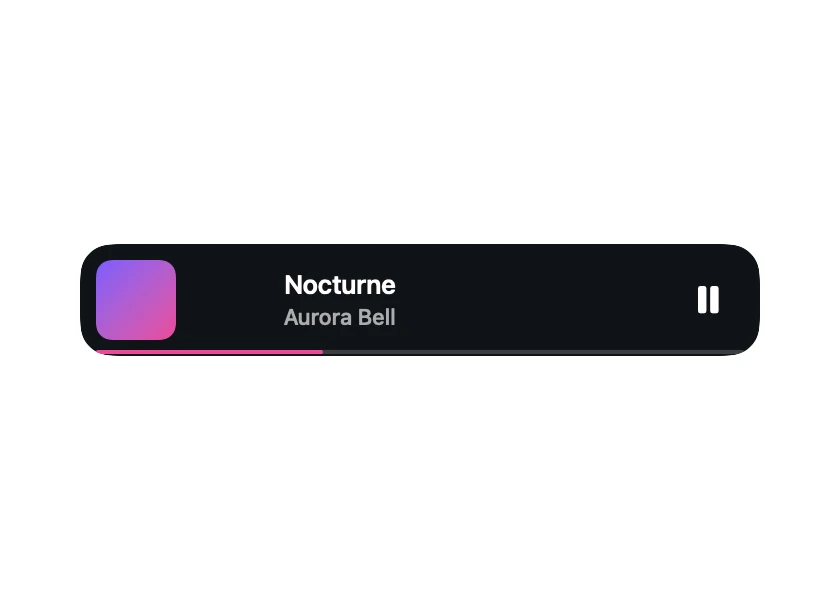
InteractiveA mini player bar that opens into a full now-playing screen, artwork growing to the centre.
Music · SwiftUI · Flutter · iOS 17 · Flutter 3.27
- music
- player
- expand
- morph
- now-playing
- artwork
- scrubber
- drag-dismiss
The actual source
MorphPlayerExpand.swift
// Player Expand · syxUI · https://syxui.dev/components/morph-player-expand
// Free in any project. Keep this line and credit syxUI where a person can read it.

import SwiftUI

/// A mini player bar that opens into a full now-playing sheet, the artwork
/// growing to the centre.
///
/// The bar's 2pt progress hairline and the sheet's scrubber are the same
/// `Capsule` — height, width and thumb radius all lerp from one `p` — which
/// is the single most convincing part of the morph. Drag-to-dismiss writes
/// straight into that same `p`, so the whole sheet runs backwards under a
/// finger instead of a separate dismiss animation taking over.
struct MorphPlayerExpand: View {
    var artA: Color = Color(red: 0.486, green: 0.361, blue: 1.0)
    var artB: Color = Color(red: 0.925, green: 0.282, blue: 0.6)
    var accent: Color = Color(red: 0.925, green: 0.282, blue: 0.6)
    var surface: Color = Color(red: 0.063, green: 0.075, blue: 0.09)
    var textColor: Color = Color(white: 1.0)
    var artSize: CGFloat = 300
    /// Preview override. 0 is the mini bar, 1 the full sheet.
    var progress: Double? = nil

    @Environment(\.accessibilityReduceMotion) private var reduceMotion
    @State private var interactive: Double = 0
    @State private var stage: Stage = .closed

    private enum Stage { case closed, open }

    private var p: Double { progress ?? interactive }

    private let barHeight: CGFloat = 56
    private let artClosed: CGFloat = 40

    private var width: CGFloat { max(340, artSize + 40) }
    private var sheetHeight: CGFloat { artSize + 230 }
    private var height: CGFloat { lerp(barHeight, sheetHeight, p) }
    private var radius: CGFloat { lerp(16, 28, p) }

    private var artworkSize: CGFloat { lerp(artClosed, artSize, p) }
    private var artworkRadius: CGFloat { lerp(8, 14, p) }
    private var artworkCentre: CGPoint {
        let closed = CGPoint(x: 8 + artClosed / 2, y: barHeight / 2)
        let open = CGPoint(x: width / 2, y: 28 + artSize / 2)
        return CGPoint(x: lerp(closed.x, open.x, p), y: lerp(closed.y, open.y, p))
    }

    private var titleCentre: CGPoint {
        let closed = CGPoint(x: 8 + artClosed + 12 + 70, y: 20)
        let open = CGPoint(x: width / 2, y: 28 + artSize + 30)
        return CGPoint(x: lerp(closed.x, open.x, p), y: lerp(closed.y, open.y, p))
    }
    private var artistCentre: CGPoint {
        let closed = CGPoint(x: 8 + artClosed + 12 + 70, y: 36)
        let open = CGPoint(x: width / 2, y: 28 + artSize + 56)
        return CGPoint(x: lerp(closed.x, open.x, p), y: lerp(closed.y, open.y, p))
    }
    private var textScale: Double { lerp(13, 20, p) / 20 }
    private var artistScale: Double { lerp(11, 15, p) / 15 }

    private var scrubberWidth: CGFloat { lerp(width - 16, width - 40, p) }
    private var scrubberHeight: CGFloat { lerp(2, 6, p) }
    private var thumbRadius: CGFloat { lerp(0, 7, p) }
    private var scrubberY: CGFloat { lerp(barHeight - 2, height - 110, p) }
    /// A fixed demo position — the scrubber's own value is not what is
    /// being morphed here, only its geometry.
    private let trackProgress: Double = 0.35

    private var controlsOpacity: Double { ramp(p, 0.60, 0.85) }
    private var miniControlsOpacity: Double { 1 - ramp(p, 0, 0.30) }
    private var backdropOpacity: Double { 0.55 * p }

    var body: some View {
        let shape = RoundedRectangle(cornerRadius: radius, style: .continuous)

        return ZStack(alignment: .topLeading) {
            // Surface first, then the backdrop blends over it at its own
            // alpha — reversing this order would let the opaque surface
            // hide the backdrop completely.
            shape.fill(surface)
            backdrop

            artwork
            title.scaleEffect(textScale).position(titleCentre)
            artist.scaleEffect(artistScale).position(artistCentre)

            scrubber
            controls.opacity(controlsOpacity)
            miniPlayButton.opacity(miniControlsOpacity)
        }
        .frame(width: width, height: height)
        .clipShape(shape)
        .contentShape(Rectangle())
        .highPriorityGesture(dragGesture)
        .onTapGesture(perform: tap)
        .accessibilityElement()
        .accessibilityAddTraits(.isButton)
        .accessibilityLabel("Now playing, Nocturne by Aurora Bell")
        .accessibilityValue(stage == .open ? "Expanded" : "Collapsed")
    }

    private var backdrop: some View {
        LinearGradient(colors: [artA, artB], startPoint: .topLeading, endPoint: .bottomTrailing)
            .blur(radius: 40)
            .saturation(1.6)
            .opacity(backdropOpacity)
            .accessibilityHidden(true)
    }

    private var artwork: some View {
        RoundedRectangle(cornerRadius: artworkRadius, style: .continuous)
            .fill(LinearGradient(colors: [artA, artB], startPoint: .topLeading, endPoint: .bottomTrailing))
            .frame(width: artworkSize, height: artworkSize)
            .position(artworkCentre)
            .accessibilityHidden(true)
    }

    private var title: some View {
        Text("Nocturne")
            .font(.system(size: 20, weight: .semibold))
            .foregroundStyle(textColor)
            .lineLimit(1)
            .accessibilityHidden(true)
    }

    private var artist: some View {
        Text("Aurora Bell")
            .font(.system(size: 15, weight: .medium))
            .foregroundStyle(textColor.opacity(0.65))
            .lineLimit(1)
            .accessibilityHidden(true)
    }

    private var scrubber: some View {
        ZStack(alignment: .leading) {
            Capsule(style: .continuous)
                .fill(textColor.opacity(0.18))
                .frame(width: scrubberWidth, height: scrubberHeight)
            Capsule(style: .continuous)
                .fill(accent)
                .frame(width: scrubberWidth * trackProgress, height: scrubberHeight)
            Circle()
                .fill(textColor)
                .frame(width: thumbRadius * 2, height: thumbRadius * 2)
                .offset(x: scrubberWidth * trackProgress - thumbRadius)
        }
        .frame(width: scrubberWidth, height: max(scrubberHeight, thumbRadius * 2), alignment: .leading)
        .position(x: width / 2, y: scrubberY)
        .accessibilityHidden(true)
    }

    private var controls: some View {
        HStack(spacing: 30) {
            Image(systemName: "backward.fill")
            Image(systemName: "pause.fill").font(.system(size: 28))
            Image(systemName: "forward.fill")
            Spacer().frame(width: 16)
            Image(systemName: "speaker.wave.2.fill").font(.system(size: 14))
        }
        .font(.system(size: 18))
        .foregroundStyle(textColor)
        .position(x: width / 2, y: height - 46)
        .accessibilityHidden(true)
    }

    private var miniPlayButton: some View {
        Image(systemName: "pause.fill")
            .font(.system(size: 16, weight: .semibold))
            .foregroundStyle(textColor)
            .position(x: width - 26, y: barHeight / 2)
            .accessibilityHidden(true)
    }

    private var dragGesture: some Gesture {
        DragGesture(minimumDistance: 6)
            .onChanged { value in
                guard progress == nil, stage == .open else { return }
                let dy = max(0, value.translation.height)
                interactive = 1 - min(dy / 260, 1)
            }
            .onEnded { value in
                guard progress == nil, stage == .open else { return }
                let dy = max(0, value.predictedEndTranslation.height)
                if dy > 130 {
                    stage = .closed
                    withAnimation(springOrSnap(response: 0.42, damping: 0.88)) { interactive = 0 }
                } else {
                    withAnimation(springOrSnap(response: 0.50, damping: 0.85)) { interactive = 1 }
                }
            }
    }

    private func tap() {
        guard progress == nil, stage == .closed else { return }
        stage = .open
        withAnimation(springOrSnap(response: 0.50, damping: 0.85)) { interactive = 1 }
    }

    private func springOrSnap(response: Double, damping: Double) -> Animation {
        reduceMotion ? .linear(duration: 0) : .spring(response: response, dampingFraction: damping)
    }
}

private func clamp(_ value: Double) -> Double { min(max(value, 0), 1) }

private func ramp(_ value: Double, _ from: Double, _ to: Double) -> Double {
    clamp((value - from) / (to - from))
}

private func lerp(_ a: CGFloat, _ b: CGFloat, _ t: Double) -> CGFloat {
    a + (b - a) * CGFloat(t)
}

private func lerp(_ a: Double, _ b: Double, _ t: Double) -> Double {
    a + (b - a) * t
}

#Preview {
    VStack(spacing: 40) {
        MorphPlayerExpand()
        MorphPlayerExpand(progress: 0.55)
    }
    .padding(40)
    .background(Color(white: 0.15))
}
iOS 17 · No dependencies
SwiftUI note. The bottom hairline and the scrubber are the same Capsule — height, width and thumb radius all lerp from `p` — never two views swapped at a threshold. In a real app the equivalent is `matchedGeometryEffect(id:in:)` between the mini bar and the sheet inside one ZStack, or `.navigationTransition(.zoom(...))` on iOS 18+; neither can be driven by a Double, so this file ships the lerped version and drag-scrubs it directly instead.
Dependencies
- SwiftUI
- No external dependencies
- Flutter
- No external dependencies
Requires iOS 17
Requires Flutter 3.27