Glass Controls
From syxUI — written for both platforms, not translated between them.
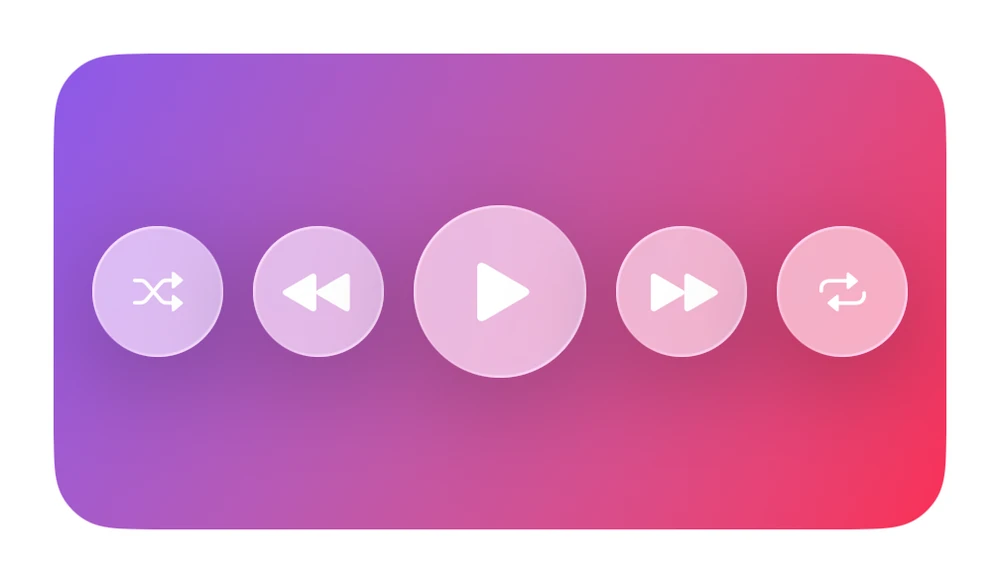
Liquid Glass playback control buttons over a gradient.
Music · SwiftUI · iOS 17
- music
- swiftui
The actual source
MusicPlayerControls.swift
// Glass Controls · syxUI · https://syxui.dev/components/music-player-controls
// Free in any project. Keep this line and credit syxUI where a person can read it.

import SwiftUI

let muPink = Color(red: 0.98, green: 0.18, blue: 0.33)

let muPurple = Color(red: 0.55, green: 0.35, blue: 0.92)

extension View {
    /// iOS 26 Liquid Glass with an ultraThinMaterial fallback for earlier versions.
    @ViewBuilder func liquidGlass<S: Shape>(_ shape: S) -> some View {
        if #available(iOS 26.0, *) { self.glassEffect(.regular, in: shape) }
        else { self.background(.ultraThinMaterial, in: shape) }
    }
}

/// ✨ Liquid Glass playback control buttons over a gradient.
struct MusicPlayerControls: View {
    var body: some View {
        ZStack {
            LinearGradient(colors: [muPurple, muPink], startPoint: .topLeading, endPoint: .bottomTrailing).frame(width: 300, height: 160)
            HStack(spacing: 10) {
                ctl("shuffle", 15); ctl("backward.fill", 17)
                Image(systemName: "play.fill").font(.system(size: 24)).foregroundStyle(.white).frame(width: 58, height: 58).liquidGlass(Circle())
                ctl("forward.fill", 17); ctl("repeat", 15)
            }.foregroundStyle(.white)
        }
        .frame(width: 300, height: 160).clipShape(RoundedRectangle(cornerRadius: 22, style: .continuous))
    }
    func ctl(_ icon: String, _ s: CGFloat) -> some View {
        Image(systemName: icon).font(.system(size: s)).foregroundStyle(.white).frame(width: 44, height: 44).liquidGlass(Circle())
    }
}
iOS 17 · No dependencies
Dependencies
- SwiftUI
- No external dependencies
Requires iOS 17