Squircle Morph
From syxUI — written for both platforms, not translated between them.
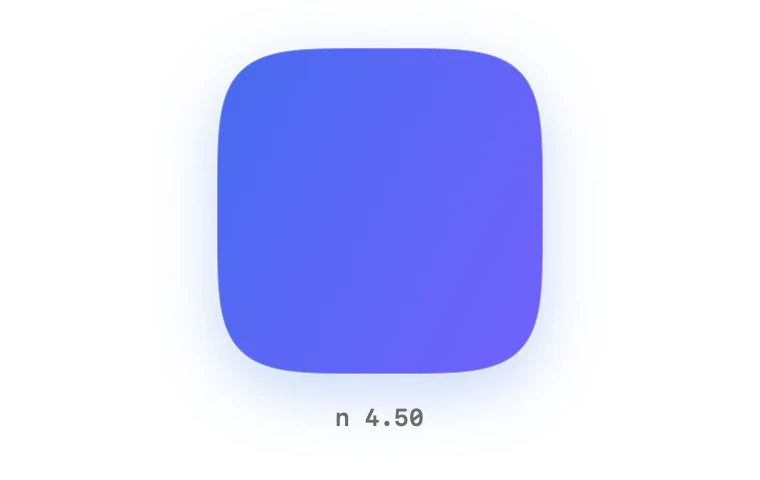
InteractiveOne superellipse exponent animating a circle into a squircle into a rectangle.
Cards · SwiftUI · Flutter · iOS 17 · Flutter 3.27
- shape
- morph
- squircle
- superellipse
- animatable
- continuous-corner
- loop
The actual source
MorphSquircle.swift
// Squircle Morph · syxUI · https://syxui.dev/components/morph-squircle
// Free in any project. Keep this line and credit syxUI where a person can read it.

import SwiftUI

/// A superellipse whose exponent animates a circle into a squircle into a card.
///
/// The outline is `|x/a|^n + |y/b|^n = 1`, and `n` is the only knob: 2 is a
/// circle, ~4.5 is the continuous corner Apple's hardware silhouettes use, 9
/// reads as a soft rectangle and 24 is all but straight-edged.
///
/// `n` and the aspect ratio are the `animatableData` of the `Shape` itself, so
/// every intermediate value is a genuinely new outline. Nothing crossfades —
/// which is the difference between a shape that morphs and two shapes that
/// swap.
struct MorphSquircle: View {
    var fillA: Color = Color(red: 0.184, green: 0.435, blue: 0.929)
    var fillB: Color = Color(red: 0.486, green: 0.361, blue: 1.0)
    var strokeColor: Color = Color(white: 1.0)

    /// Exponent at the far end of the morph. The near end is always a circle,
    /// so this is what the shape *becomes*.
    var exponent: Double = 4.5

    /// Width over height at the far end. 1 keeps the card square; raise it and
    /// the shape reads as becoming a card rather than a blob inflating.
    var aspect: Double = 1.0

    /// Points sampled per quadrant. Below about 40 the straight flanks facet
    /// at high exponents; above 120 you are paying for nothing.
    var samples: Int = 96

    /// Preview override. When set, the component renders that point of one
    /// loop instead of waiting for a tap.
    var progress: Double? = nil

    @Environment(\.accessibilityReduceMotion) private var reduceMotion

    /// Four tap stops across the morph, so the named presets are reachable
    /// rather than only the two ends.
    private static let stops = 4

    @State private var stop = MorphSquircle.stops - 1
    @State private var rising = false

    private var amount: Double {
        if let progress { return Self.loopAmount(progress) }
        return Double(stop) / Double(Self.stops - 1)
    }

    /// Geometric, not linear. 2 → 4.5 is a far larger visual change than
    /// 20 → 24, so a linear ramp would spend most of the morph already looking
    /// rectangular.
    private var currentExponent: Double {
        2 * pow(max(exponent, 2) / 2, amount)
    }

    private var currentRatio: Double {
        1 + (aspect - 1) * amount
    }

    var body: some View {
        let shape = MorphSquircleOutline(
            n: currentExponent,
            ratio: currentRatio,
            samples: samples
        )

        VStack(spacing: 14) {
            shape
                .fill(
                    LinearGradient(
                        colors: [fillA, fillB],
                        startPoint: .topLeading,
                        endPoint: .bottomTrailing
                    )
                )
                // The hairline keeps the silhouette crisp at every exponent —
                // a pure gradient fill loses its edge against a light ground.
                .overlay { shape.stroke(strokeColor.opacity(0.28), lineWidth: 1) }
                .shadow(color: fillA.opacity(0.26), radius: 16, y: 9)
                .frame(maxWidth: .infinity, maxHeight: .infinity)

            Text("n " + String(format: "%.2f", currentExponent))
                .font(.system(size: 12, weight: .semibold, design: .monospaced))
                .foregroundStyle(Color(white: 0.42))
        }
        .contentShape(Rectangle())
        .onTapGesture(perform: advance)
        // Curve at the call site, geometry linear in `amount`: controlled mode
        // then stays a clean 0...1 and the preview stage can ease it itself.
        .animation(reduceMotion ? nil : .easeInOut(duration: 0.7), value: stop)
        .sensoryFeedback(.selection, trigger: stop)
        .accessibilityElement()
        .accessibilityAddTraits(.isButton)
        .accessibilityLabel("Squircle morph")
        .accessibilityValue(String(format: "exponent %.1f", currentExponent))
        .accessibilityHint("Cycles the corner presets")
    }

    /// Walks the stops up and back down rather than wrapping, so no tap ever
    /// jumps the whole range in one step.
    private func advance() {
        guard progress == nil else { return }
        var next = stop + (rising ? 1 : -1)
        if next > Self.stops - 1 {
            next = Self.stops - 2
            rising = false
        }
        if next < 0 {
            next = 1
            rising = true
        }
        stop = next
    }

    /// Dwelling triangle over one loop: out over the first third, hold, back
    /// over the last third. A plain triangle is in transit on every frame and
    /// the sampled stills never land on a shape worth naming.
    private static func loopAmount(_ t: Double) -> Double {
        let ramp = 0.34
        if t < ramp { return smoothstep(t / ramp) }
        if t < 0.5 { return 1 }
        if t < 0.5 + ramp { return 1 - smoothstep((t - 0.5) / ramp) }
        return 0
    }

    private static func smoothstep(_ x: Double) -> Double {
        let c = min(max(x, 0), 1)
        return c * c * (3 - 2 * c)
    }
}

/// The superellipse itself.
///
/// Sampled directly from the parametric form rather than approximated with
/// bezier corners: an approximation drifts away from the curve as `n` climbs,
/// and the drift is exactly what a reader is looking at.
private struct MorphSquircleOutline: Shape {
    var n: Double
    var ratio: Double
    var samples: Int

    /// Both interpolants travel together, so the exponent and the aspect can
    /// never fall out of step mid-morph.
    var animatableData: AnimatablePair<Double, Double> {
        get { AnimatablePair(n, ratio) }
        set {
            n = newValue.first
            ratio = newValue.second
        }
    }

    func path(in rect: CGRect) -> Path {
        let safeRatio = max(ratio, 0.05)
        let height = min(rect.height, rect.width / safeRatio)
        let width = height * safeRatio
        let a = width / 2
        let b = height / 2
        let centre = CGPoint(x: rect.midX, y: rect.midY)

        // 2/n is the parametric exponent for |x/a|^n + |y/b|^n = 1.
        let power = 2 / max(n, 0.5)
        let count = max(samples, 4)

        // One quadrant is sampled and mirrored into the other three: the curve
        // is symmetric by construction, so sampling the full turn would spend
        // four times the trigonometry on the same outline.
        var quadrant: [CGPoint] = []
        quadrant.reserveCapacity(count + 1)
        for index in 0...count {
            let theta = Double(index) / Double(count) * .pi / 2
            quadrant.append(
                CGPoint(
                    x: a * CGFloat(pow(max(cos(theta), 0), power)),
                    y: b * CGFloat(pow(max(sin(theta), 0), power))
                )
            )
        }

        var path = Path()
        path.move(to: CGPoint(x: centre.x + quadrant[0].x, y: centre.y + quadrant[0].y))
        for point in quadrant.dropFirst() {
            path.addLine(to: CGPoint(x: centre.x + point.x, y: centre.y + point.y))
        }
        for point in quadrant.reversed().dropFirst() {
            path.addLine(to: CGPoint(x: centre.x - point.x, y: centre.y + point.y))
        }
        for point in quadrant.dropFirst() {
            path.addLine(to: CGPoint(x: centre.x - point.x, y: centre.y - point.y))
        }
        for point in quadrant.reversed().dropFirst() {
            path.addLine(to: CGPoint(x: centre.x + point.x, y: centre.y - point.y))
        }
        path.closeSubpath()
        return path
    }
}

#Preview {
    MorphSquircle()
        .frame(width: 380, height: 240)
        .padding(24)
}
iOS 17 · No dependencies
SwiftUI note. The exponent and aspect ride in the Shape's animatableData, so withAnimation tweens the outline itself. Lift the outline struct out and wrap it in AnyShape if you want to swap it against a named shape at the call site.
Dependencies
- SwiftUI
- No external dependencies
- Flutter
- No external dependencies
Requires iOS 17
Requires Flutter 3.27