Glitch Text
From syxUI — written for both platforms, not translated between them.
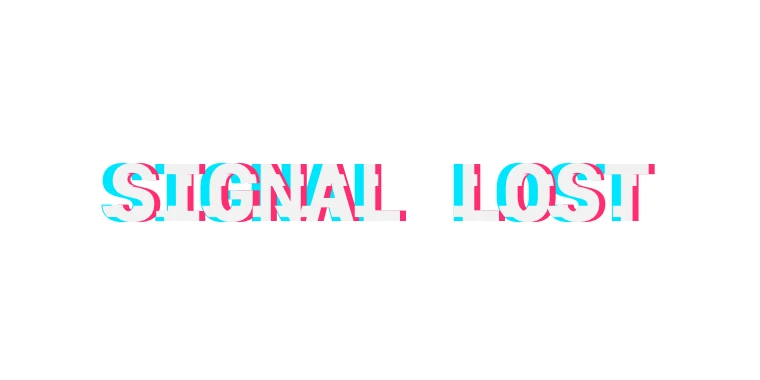
Type that tears into RGB channels and slips in slices, then recovers.
Text Effects · SwiftUI · Flutter · iOS 17 · Flutter 3.27
- text
- glitch
- rgb
- distortion
- cyberpunk
- noise
- animation
The actual source
GlitchText.swift
// Glitch Text · syxUI · https://syxui.dev/components/glitch-text
// Free in any project. Keep this line and credit syxUI where a person can read it.

import SwiftUI

/// Type that tears into RGB channels and slips in slices, then recovers.
///
/// Both effects are stepped, never eased — a glitch that eases looks like
/// animation, one that snaps looks like signal loss. That stepping comes
/// from flooring elapsed time into 90ms buckets and hashing the bucket
/// index, so the driver is `TimelineView(.animation)` reading real elapsed
/// time rather than `withAnimation` interpolating a value — nothing here
/// should ease between buckets. Everything is drawn in one `Canvas` pass:
/// `context.resolve(Text(...))` gives a reusable resolved glyph run, and
/// `context.drawLayer` clips, blends and offsets copies of it without
/// exploding into a view per channel. All randomness is a deterministic
/// hash of the bucket index, never `Random()`, so the preview renderer
/// samples the same frames on every run. `phase` is a continuous loop here
/// (not `progress`) because the glitch repeats forever rather than settling
/// once.
struct GlitchText: View {
    var text: String = "SIGNAL LOST"
    var intensity: Double = 0.5
    /// Milliseconds between the start of one burst and the next.
    var burstInterval: Double = 1800
    var channelSplit: Double = 3
    var colors: [Color] = [
        Color(red: 0.0, green: 0.898, blue: 1.0),
        Color(red: 1.0, green: 0.176, blue: 0.435),
    ]
    /// `GraphicsContext` has its own blend mode type, distinct from the one
    /// `.blendMode(_:)` takes on a view. The cases are spelled the same.
    var blend: GraphicsContext.BlendMode = .screen
    var fontSize: CGFloat = 40
    var textColor: Color = Color(white: 0.95)

    /// Preview override. When set, the type renders that point of one full
    /// burst-and-recover loop instead of running its own clock.
    var phase: Double? = nil

    @Environment(\.accessibilityReduceMotion) private var reduceMotion
    @State private var startDate: Date? = nil

    var body: some View {
        Group {
            if let phase {
                canvas(current: phase)
            } else if reduceMotion {
                canvas(current: 0)
            } else {
                TimelineView(.animation) { timeline in
                    let elapsed = startDate.map { timeline.date.timeIntervalSince($0) } ?? 0
                    let loop = max(burstInterval / 1000, 0.05)
                    canvas(current: elapsed.truncatingRemainder(dividingBy: loop) / loop)
                }
            }
        }
        .onAppear { if startDate == nil { startDate = Date() } }
        // A Canvas has no automatic accessibility tree of its own.
        .accessibilityElement(children: .ignore)
        .accessibilityLabel(text)
    }

    /// `current` is one loop's fraction, 0...1. `reduceMotion` always wins
    /// regardless of what is passed in, so a settled frame never depends on
    /// catching `current` at the right moment.
    private func canvas(current: Double) -> some View {
        Canvas { context, size in
            let font = Font.system(size: fontSize, weight: .bold, design: .monospaced)
            let resolved = context.resolve(Text(text).font(font).foregroundColor(textColor))
            let textSize = resolved.measure(in: size)
            let origin = CGPoint(x: (size.width - textSize.width) / 2, y: (size.height - textSize.height) / 2)

            guard !reduceMotion else {
                context.draw(resolved, at: origin, anchor: .topLeading)
                return
            }

            let elapsedMs = current * burstInterval
            guard elapsedMs < 220 else {
                context.draw(resolved, at: origin, anchor: .topLeading)
                return
            }

            let bucket = Int(elapsedMs / 90)
            drawChannelSplit(context: context, font: font, origin: origin, bucket: bucket)
            context.draw(resolved, at: origin, anchor: .topLeading)
            drawSlices(context: context, resolved: resolved, origin: origin, textSize: textSize, bucket: bucket)
        }
    }

    /// A colour copy on each side of centre, re-rolling its jitter every
    /// 90ms bucket. Drawn under the sharp base text, so the fringe only
    /// shows where the offset carries it past the base glyph's edge.
    private func drawChannelSplit(context: GraphicsContext, font: Font, origin: CGPoint, bucket: Int) {
        let sides: [(salt: Int, direction: CGFloat, color: Color)] = [
            (1, -1, colors.first ?? textColor),
            (2, 1, colors.count > 1 ? colors[1] : textColor),
        ]
        for side in sides {
            let jitter = deterministicUnit(bucket, side.salt) * 6 * intensity
            let dx = side.direction * (channelSplit + jitter)
            let tinted = context.resolve(Text(text).font(font).foregroundColor(side.color))
            context.drawLayer { layer in
                layer.blendMode = blend
                layer.translateBy(x: dx, y: 0)
                layer.draw(tinted, at: origin, anchor: .topLeading)
            }
        }
    }

    /// Three fixed horizontal thirds of the line, each independently a
    /// 1-in-4 chance per bucket to shift sideways.
    private func drawSlices(
        context: GraphicsContext, resolved: GraphicsContext.ResolvedText,
        origin: CGPoint, textSize: CGSize, bucket: Int
    ) {
        for slice in 0..<3 {
            guard deterministicUnit(bucket, 10 + slice) > 0.75 else { continue }

            let heightFraction = 0.12 + 0.10 * deterministicUnit(bucket, 20 + slice)
            let bandHeight = textSize.height * heightFraction
            let bandTop = origin.y + textSize.height * (Double(slice) / 3)
            let dx = (deterministicUnit(bucket, 30 + slice) * 2 - 1) * 10 * intensity

            let sliceRect = CGRect(
                x: origin.x - abs(dx), y: bandTop,
                width: textSize.width + abs(dx) * 2, height: bandHeight
            )

            context.drawLayer { layer in
                layer.clip(to: Path(sliceRect))
                layer.translateBy(x: dx, y: 0)
                layer.draw(resolved, at: origin, anchor: .topLeading)
            }
        }
    }

    /// MurmurHash3-style finalizer over `(bucket, salt)`, folded to 0...1.
    /// Deterministic and well distributed, with no dependency on a seeded RNG.
    private func deterministicUnit(_ bucket: Int, _ salt: Int) -> Double {
        var x = UInt64(bitPattern: Int64(bucket &* 2_654_435_761 &+ salt &* 40_503))
        x ^= x >> 33
        x = x &* 0xff51_afd7_ed55_8ccd
        x ^= x >> 33
        return Double(x % 10_000) / 10_000
    }
}

#Preview {
    GlitchText()
        .frame(width: 380, height: 160)
}
iOS 17 · No dependencies
SwiftUI note. Runs on `TimelineView(.animation)` reading real elapsed time, floored into 90ms buckets — never `withAnimation`, since the jitter must snap, not ease. `context.resolve(Text(...))` is what keeps this to one `Canvas` pass instead of a view per channel.
Dependencies
- SwiftUI
- No external dependencies
- Flutter
- No external dependencies
Requires iOS 17
Requires Flutter 3.27