Kinetic Scale Text
From syxUI — written for both platforms, not translated between them.
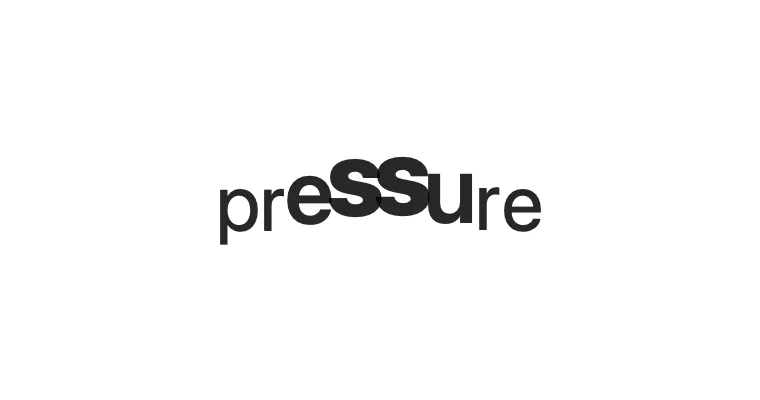
InteractiveA pressure point sweeps the line, swelling and thickening each glyph.
Text Effects · SwiftUI · Flutter · iOS 17 · Flutter 3.27
- text
- kinetic
- pressure
- scale
- interactive
- typography
- animation
The actual source
KineticScaleText.swift
// Kinetic Scale Text · syxUI · https://syxui.dev/components/kinetic-scale-text
// Free in any project. Keep this line and credit syxUI where a person can read it.

import SwiftUI

/// A pressure point sweeping the line, swelling and thickening each glyph it
/// passes over.
///
/// Leave `point` nil and a clock drives the sweep; set it — from a drag or a
/// pointer — and that position takes over. The clock-driven path still
/// exists so the effect reads as something without a finger on it.
struct KineticScaleText: View {
    var text: String = "pressure"
    /// Extra scale at the peak.
    var boost: Double = 0.34
    /// Falloff width, in characters.
    var reach: Double = 2.8
    /// One full sweep, in seconds.
    var period: Double = 3.2
    var pushApart: Bool = true
    /// Reverse at the ends instead of wrapping.
    var pingPong: Bool = true
    /// A live pointer position, in the text's own local coordinate space,
    /// that overrides the clock-driven sweep.
    var point: CGPoint? = nil
    /// Preview override. `0...1` is exactly one sweep — seamless only when
    /// `pingPong` is true, since a wrap otherwise jumps.
    var phase: Double? = nil

    @Environment(\.accessibilityReduceMotion) private var reduceMotion
    @State private var dragPoint: CGPoint? = nil

    private let fontSize: CGFloat = 40
    /// Rough advance width used to turn a pointer's x into a character
    /// index. A real per-glyph measurement (Canvas + `context.resolve`)
    /// would track exactly; this is the cheap, dependency-free trade.
    private var averageCharWidth: CGFloat { fontSize * 0.6 }

    var body: some View {
        TimelineView(.animation(paused: reduceMotion)) { context in
            let characters = Array(text)
            let peak = peakIndex(count: characters.count, at: context.date)

            HStack(spacing: 0) {
                ForEach(characters.indices, id: \.self) { index in
                    character(characters[index], index: index, peak: peak)
                }
            }
            .contentShape(Rectangle())
            .gesture(
                DragGesture(minimumDistance: 0)
                    .onChanged { value in dragPoint = value.location }
                    .onEnded { _ in dragPoint = nil }
            )
        }
        .accessibilityElement(children: .ignore)
        .accessibilityLabel(text)
    }

    private func peakIndex(count: Int, at date: Date) -> Double {
        guard count > 0 else { return 0 }

        if let live = point ?? dragPoint {
            return min(max(Double(live.x / averageCharWidth), 0), Double(count - 1))
        }

        let cycle = currentPhase(at: date)
        // `pingPong` makes one period a full there-and-back trip; without
        // it the point wraps from the end straight back to the start.
        let position = pingPong ? 1 - abs(1 - 2 * cycle) : cycle
        return position * Double(count - 1)
    }

    private func currentPhase(at date: Date) -> Double {
        if let phase { return min(max(phase, 0), 1) }
        if reduceMotion { return 0 }
        let ms = date.timeIntervalSinceReferenceDate * 1000
        return (ms / (period * 1000)).truncatingRemainder(dividingBy: 1)
    }

    @ViewBuilder
    private func character(_ character: Character, index: Int, peak: Double) -> some View {
        // Reduce Motion settles on the flat line rather than a frozen
        // mid-sweep frame — there is no single "resting" point to land on.
        let intensity = reduceMotion ? 0 : raisedCosine(abs(Double(index) - peak))

        Text(String(character))
            .font(.system(size: fontSize, weight: weight(for: intensity)))
            .scaleEffect(1 + boost * intensity, anchor: .bottom)
            .offset(y: -6 * intensity)
            // Half the extra width on each side: the neighbour is shoved,
            // not just the character under the point.
            .padding(.horizontal, pushApart ? 0.75 * intensity : 0)
    }

    /// Raised-cosine falloff: 1 at the peak, 0 at `reach` characters away,
    /// and — unlike a triangle or a hard cutoff — its derivative is zero at
    /// both ends, so neighbouring glyphs ease in rather than crease.
    private func raisedCosine(_ distance: Double) -> Double {
        guard reach > 0, distance < reach else { return 0 }
        return 0.5 * (1 + cos(.pi * distance / reach))
    }

    /// Nine-step `Font.Weight`, snapped from the continuous 400-800 the
    /// effect calls for. Dependency-free; the CoreText `wght` axis would
    /// make the thickening continuous at the cost of a platform typealias.
    private func weight(for intensity: Double) -> Font.Weight {
        switch 400 + intensity * 400 {
        case ..<450: .regular
        case ..<550: .medium
        case ..<650: .semibold
        case ..<750: .bold
        default: .heavy
        }
    }
}

#Preview {
    KineticScaleText()
        .padding(30)
}
iOS 17 · No dependencies
SwiftUI note. Weight snaps across five Font.Weight steps rather than sweeping continuously — a real wght-axis interpolation is possible via CoreText but was not worth the platform typealias here. The pointer's x is converted to a character index with an average advance-width estimate, not per-glyph metrics, so very irregular strings track a little loosely.
Dependencies
- SwiftUI
- No external dependencies
- Flutter
- No external dependencies
Requires iOS 17
Requires Flutter 3.27