Line Shadow Text
From syxUI — written for both platforms, not translated between them.
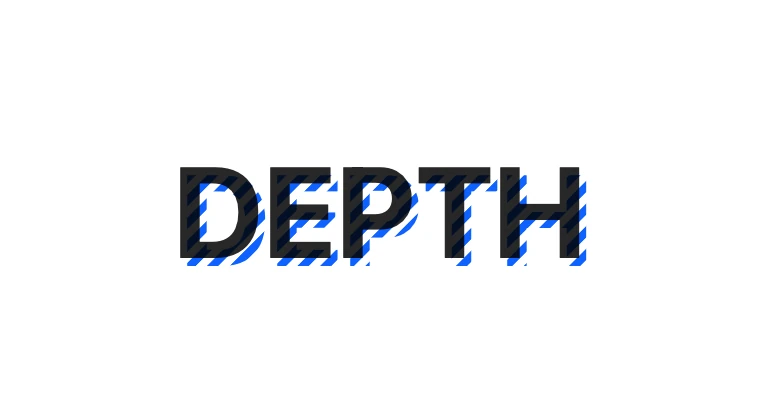
Extruded type whose shadow is a hatch of lines that flows as you watch.
Text Effects · SwiftUI · Flutter · iOS 17 · Flutter 3.27
- text
- shadow
- hatch
- extrude
- poster
- editorial
- animation
The actual source
LineShadowText.swift
// Line Shadow Text · syxUI · https://syxui.dev/components/line-shadow-text
// Free in any project. Keep this line and credit syxUI where a person can read it.

import SwiftUI

/// Extruded type whose shadow is a hatch of lines that flows as you watch.
///
/// The back copy is a `Canvas` of parallel stripes clipped to the glyph
/// shapes via `.mask`, offset down-right by `depth`; the front copy is a
/// plain, solid `Text`. Canvas contents are one of the properties
/// `withAnimation` genuinely interpolates (`ripple-grid` is the existing
/// proof), so the flow needs no `TimelineView` — a `@State` fraction driven
/// linearly and read straight into the stripe geometry is enough.
struct LineShadowText: View {
    var text: String = "DEPTH"
    var shadowColor: Color = Color(red: 0.059, green: 0.384, blue: 0.996)
    /// Shadow offset, in em.
    var depth: Double = 0.06
    var stripe: Double = 4
    /// Flow speed, in pt/s.
    var speed: Double = 8
    var angle: Double = 45
    /// Preview override. One full cycle is exactly one stripe period.
    var phase: Double? = nil

    @Environment(\.accessibilityReduceMotion) private var reduceMotion
    @State private var animated: Double = 0
    @State private var grown: Double = 0

    private let fontSize: CGFloat = 64

    private var current: Double { reduceMotion ? 0 : (phase ?? animated) }
    /// Seconds for the flow to advance by exactly one stripe period — the
    /// point at which the hatch looks identical to where it started.
    private var loopPeriod: Double { max(stripe * 2 / max(speed, 0.1), 0.1) }

    var body: some View {
        // Preview scrubbing wants the settled, fully-extruded look; only the
        // live, self-driven path grows `depth` in on appear.
        let depthPt = CGFloat(depth) * fontSize * (phase == nil ? grown : 1)
        let flow = CGFloat(current) * CGFloat(stripe * 2)

        ZStack {
            Canvas { context, size in
                hatch(in: &context, size: size, flow: flow)
            }
            .mask { Text(text).font(.system(size: fontSize, weight: .bold)) }
            .offset(x: depthPt, y: depthPt)
            .accessibilityHidden(true)

            Text(text)
                .font(.system(size: fontSize, weight: .bold))
        }
        .onAppear(perform: start)
        .accessibilityElement(children: .ignore)
        .accessibilityLabel(text)
    }

    private func hatch(in context: inout GraphicsContext, size: CGSize, flow: CGFloat) {
        // A generously oversized, rotated field of stripes so the hatch
        // still fully covers the glyphs after rotation, at any angle.
        let span = hypot(size.width, size.height) * 1.6
        let periodPt = CGFloat(stripe * 2)
        var lines = Path()
        var x = -span - flow.truncatingRemainder(dividingBy: periodPt)
        while x < span {
            lines.addRect(CGRect(x: x, y: -span / 2, width: stripe, height: span))
            x += periodPt
        }

        context.translateBy(x: size.width / 2, y: size.height / 2)
        context.rotate(by: .degrees(angle))
        context.fill(lines, with: .color(shadowColor))
    }

    private func start() {
        guard !reduceMotion else { return }
        withAnimation(.easeOut(duration: 0.4)) { grown = 1 }
        guard phase == nil else { return }
        withAnimation(.linear(duration: loopPeriod).repeatForever(autoreverses: false)) {
            animated = 1
        }
    }
}

#Preview {
    LineShadowText()
        .frame(width: 380, height: 240)
        .padding(24)
}
iOS 17 · No dependencies
SwiftUI note. The hatch is a hand-built `Canvas` field of rects rather than a tiled gradient — Canvas contents are one of the properties `withAnimation` genuinely interpolates, so this stays as cheap as `ripple-grid`.
Dependencies
- SwiftUI
- No external dependencies
- Flutter
- No external dependencies
Requires iOS 17
Requires Flutter 3.27